# CloudFront
Source: /aws/services/cloudfront/
## Introduction
CloudFront is a content delivery network (CDN) service provided by Amazon Web Services (AWS).
CloudFront distributes its web content, videos, applications, and APIs with low latency and high data transfer speeds.
CloudFront APIs allow you to configure distributions, customize cache behavior, secure content with access controls, and monitor the CDN's performance through real-time metrics.
LocalStack allows you to use the CloudFront APIs in your local environment to create local CloudFront distributions to transparently access your applications and file artifacts.
LocalStack also runs [CloudFront Functions](#cloudfront-functions) at request time and emulates [CloudFront KeyValueStore](#keyvaluestore-), so you can develop edge logic such as a tenant pre-router locally instead of validating it against live AWS.
The supported APIs are available on our [API Coverage section](#api-coverage), which provides information on the extent of CloudFront's integration with LocalStack.
## Getting started
This guide is intended for users who wish to get more acquainted with CloudFront over LocalStack.
It assumes you have basic knowledge of the AWS CLI (and our [`lstk aws`](/aws/developer-tools/running-localstack/lstk/cloud-and-iac-commands/#aws) command).
Start your LocalStack container using your preferred method.
We will demonstrate how you can create an S3 bucket, put a text file named `hello.txt` to the bucket, and then create a CloudFront distribution which makes the file accessible via a `https://abc123.cloudfront.net/hello.txt` proxy URL (where `abc123` is a placeholder for the real distribution ID).
To get started, create an S3 bucket using the `mb` command:
```bash
lstk aws s3 mb s3://abc123
```
You can now go ahead, create a new text file named `hello.txt` and upload it to the bucket:
```bash
echo 'Hello World' > /tmp/hello.txt
lstk aws s3 cp /tmp/hello.txt s3://abc123/hello.txt --acl public-read
```
After uploading the file to S3, you can create a CloudFront distribution using the [`CreateDistribution`](https://docs.aws.amazon.com/cloudfront/latest/APIReference/API_CreateDistribution.html) API call.
Run the following command to create a distribution with the default settings:
```bash
domain=$(lstk aws cloudfront create-distribution \
--origin-domain-name abc123.s3.amazonaws.com | jq -r '.Distribution.DomainName')
curl -k https://$domain/hello.txt
```
:::tip
If you wish to use CloudFront on system host, ensure your local DNS setup is correctly configured.
Refer to the section on [System DNS configuration](/aws/customization/networking/dns-server#system-dns-configuration) for details.
:::
In the example provided above, be aware that the final command (`curl https://$domain/hello.txt`) might encounter a temporary failure accompanied by a warning message `Could not resolve host`.
This can occur because different operating systems adopt diverse DNS caching strategies, causing a delay in the availability of the CloudFront distribution's DNS name (e.g., `abc123.cloudfront.net`) within the system.
Typically, after a few retries, the command should succeed.
It's worth noting that similar behavior can be observed in the actual AWS environment, where CloudFront DNS names may take up to 10-15 minutes to propagate across the network.
## CloudFront Functions
[CloudFront Functions](https://docs.aws.amazon.com/AmazonCloudFront/latest/DeveloperGuide/cloudfront-functions.html) are lightweight JavaScript functions that run at the edge to inspect and rewrite requests.
LocalStack executes `viewer-request` functions at request time, so you can create a function, validate it with [`TestFunction`](https://docs.aws.amazon.com/cloudfront/latest/APIReference/API_TestFunction.html), publish it, attach it to a distribution, and observe its effect on a live request.
### Create a function
Write the function code to a file.
The handler must be a top-level function named `handler`:
```javascript title="stamp-env.js"
function handler(event) {
var request = event.request;
request.headers['x-erp-env'] = { value: 'prod' };
return request;
}
```
Create the function with [`CreateFunction`](https://docs.aws.amazon.com/cloudfront/latest/APIReference/API_CreateFunction.html):
```bash
lstk aws cloudfront create-function \
--name stamp-env \
--function-code fileb://stamp-env.js \
--function-config 'Comment=stamp the environment,Runtime=cloudfront-js-2.0'
```
```bash title="Output"
{
"Location": "TODO",
"ETag": "54ddd071",
"FunctionSummary": {
"Name": "stamp-env",
"Status": "UNPUBLISHED",
"FunctionConfig": {
"Comment": "stamp the environment",
"Runtime": "cloudfront-js-2.0"
},
"FunctionMetadata": {
"FunctionARN": "arn:aws:cloudfront::000000000000:function/stamp-env",
"Stage": "DEVELOPMENT",
"CreatedTime": "2026-08-20T15:28:49.477222+00:00",
"LastModifiedTime": "2026-08-20T15:28:49.477226+00:00"
}
}
}
```
### Test a function
`TestFunction` runs the function against a sample event and returns the computed output.
This is how you validate the logic without sending a request through a distribution.
Write the event object to a file:
```json title="event.json" showLineNumbers
{
"version": "1.0",
"context": { "eventType": "viewer-request" },
"viewer": { "ip": "1.2.3.4" },
"request": {
"method": "GET",
"uri": "/index.html",
"querystring": {},
"headers": { "host": { "value": "tenant-b.example.com" } },
"cookies": {}
}
}
```
Pass the ETag returned by `create-function` as `--if-match`:
```bash
lstk aws cloudfront test-function \
--name stamp-env \
--if-match 54ddd071 \
--event-object fileb://event.json \
--query 'TestResult.{Output:FunctionOutput,Logs:FunctionExecutionLogs,Error:FunctionErrorMessage}'
```
```bash title="Output"
{
"Output": "{\"request\": {\"method\": \"GET\", \"uri\": \"/index.html\", \"querystring\": {}, \"headers\": {\"host\": {\"value\": \"tenant-b.example.com\"}, \"x-erp-env\": {\"value\": \"prod\"}}, \"cookies\": {}}}",
"Logs": [],
"Error": ""
}
```
`FunctionOutput` is wrapped in `request` when the function returns a request, and in `response` when it returns a response object.
Anything the function writes with `console.log`, `console.error` or the other `console` methods is collected in `FunctionExecutionLogs`:
```bash title="Output"
[
"routing tenant-b.example.com",
"uri /index.html"
]
```
A function that raises at runtime does not fail the API call.
`TestFunction` returns `200` with the error in `FunctionErrorMessage` and `FunctionOutput` set to `{}`.
:::note
The text of `FunctionErrorMessage` is a raw JavaScript stack trace from the local runtime and does not match the wording AWS returns.
Use it for debugging, but do not assert on it in tests.
:::
### Publish a function
[`PublishFunction`](https://docs.aws.amazon.com/cloudfront/latest/APIReference/API_PublishFunction.html) marks the function ready to associate with a distribution:
```bash
lstk aws cloudfront publish-function --name stamp-env --if-match 54ddd071
```
```bash title="Output"
{
"FunctionSummary": {
"Name": "stamp-env",
"Status": "UNASSOCIATED",
"FunctionConfig": {
"Comment": "stamp the environment",
"Runtime": "cloudfront-js-2.0"
},
"FunctionMetadata": {
"FunctionARN": "arn:aws:cloudfront::000000000000:function/stamp-env",
"Stage": "DEVELOPMENT",
"CreatedTime": "2026-08-20T15:28:49.477222+00:00",
"LastModifiedTime": "2026-08-20T15:28:49.477226+00:00"
}
}
}
```
### Attach the function to a distribution
Add the function ARN to `FunctionAssociations` on the `DefaultCacheBehavior` of your distribution config:
```json title="distribution-config.json (excerpt)"
"DefaultCacheBehavior": {
"TargetOriginId": "erp-origin",
"ViewerProtocolPolicy": "allow-all",
"ForwardedValues": { "QueryString": false, "Cookies": { "Forward": "none" } },
"MinTTL": 0,
"FunctionAssociations": {
"Quantity": 1,
"Items": [
{
"EventType": "viewer-request",
"FunctionARN": "arn:aws:cloudfront::000000000000:function/stamp-env"
}
]
}
}
```
Every request through the distribution now runs the function before the origin is contacted.
See [Tenant routing at the edge](#tenant-routing-at-the-edge) for a complete, working configuration.
### Returning a response directly
A function can end the request without contacting the origin by returning an object with a `statusCode`.
LocalStack applies the status code, headers, cookies and body:
```javascript title="block-tenant.js"
function handler(event) {
return {
statusCode: 403,
headers: { 'x-blocked-tenant': { value: 'acme' } },
cookies: {
blocked: { value: '1', attributes: 'Path=/; Secure' },
trace: { value: 'abc' }
},
body: { encoding: 'text', data: 'tenant blocked' }
};
}
```
`body.encoding` accepts `text` and `base64`.
Each entry in `cookies` becomes a `Set-Cookie` header, with `attributes` appended verbatim and `multiValue` entries emitted as additional headers of the same name.
If the function raises at request time, the distribution responds with `500` and the body `The CloudFront function associated with the distribution failed to execute.`
### Current limitations
- Only `viewer-request` associations execute. `viewer-response` associations are stored but never run.
- Only associations on the `DefaultCacheBehavior` execute. Associations on other cache behaviors are stored but never run.
- Only `uri` and `headers` from the returned request are applied. Changes to `querystring`, `cookies` and `method` are discarded.
- `cf.kvs()` is the only runtime helper. `cf.crypto`, `cf.querystring` and `cf.updateRequestOrigin()` are not available.
- `statusDescription` is not propagated when a function returns a response directly. The reason phrase is regenerated from the status code.
- Publishing is not enforced at request time: an unpublished function attached to a distribution still runs. `PublishFunction` updates `Status` but `Stage` remains `DEVELOPMENT`.
- One code blob is stored per function, so the `DEVELOPMENT` and `LIVE` stages resolve to the same code and the `--stage` option of `test-function` has no effect.
- `ComputeUtilization` is always `"0"`.
- `Location` in the `CreateFunction` response is the placeholder string `TODO` instead of a URL.
- Functions run on Node.js rather than the restricted CloudFront JavaScript runtime. Code that uses Node.js globals or `fetch` works locally and fails on AWS. Conversely, only `import` statements that reference `cloudfront` are removed before execution, so any other import, such as `crypto`, raises a `SyntaxError` locally even though AWS supports it.
- Function executions are serialized on a single Node.js process, which limits throughput under concurrent requests.
:::note
AWS requires `import cf from 'cloudfront'` in a `cloudfront-js-2.0` function.
LocalStack removes that line before execution and also exposes `cf` as a global, so a function that omits the import runs locally and fails on AWS.
Always write the import.
:::
## KeyValueStore
A [CloudFront KeyValueStore](https://docs.aws.amazon.com/AmazonCloudFront/latest/DeveloperGuide/kvs-with-functions.html) holds key-value data that a CloudFront Function reads at request time, which lets you change the data a function acts on without republishing it.
It is split across two APIs: the stores themselves are managed through the `cloudfront` control plane, and their contents are read and written through the separate `cloudfront-keyvaluestore` data plane.
:::note
The two planes are licensed separately.
The control-plane operations belong to CloudFront, while the `cloudfront-keyvaluestore` data plane requires a plan that includes it.
On a plan without the data plane you can create a store and associate it with a function, but you cannot write keys, and `cf.kvs().get()` then fails at request time.
:::
### Create a key value store
Create a store with [`CreateKeyValueStore`](https://docs.aws.amazon.com/cloudfront/latest/APIReference/API_CreateKeyValueStore.html):
```bash
lstk aws cloudfront create-key-value-store \
--name tenant-map \
--comment "tenant to environment"
```
```bash title="Output"
{
"ETag": "02CDEC9C",
"Location": "arn:aws:cloudfront::000000000000:key-value-store/d1fa734b-f440-4ebe-b477-8a12c8383488",
"KeyValueStore": {
"Name": "tenant-map",
"Id": "d1fa734b-f440-4ebe-b477-8a12c8383488",
"Comment": "tenant to environment",
"ARN": "arn:aws:cloudfront::000000000000:key-value-store/d1fa734b-f440-4ebe-b477-8a12c8383488",
"Status": "READY",
"LastModifiedTime": "2026-08-20T15:28:15.621304+00:00"
}
}
```
The remaining control-plane operations are [`DescribeKeyValueStore`](https://docs.aws.amazon.com/cloudfront/latest/APIReference/API_DescribeKeyValueStore.html), [`ListKeyValueStores`](https://docs.aws.amazon.com/cloudfront/latest/APIReference/API_ListKeyValueStores.html), [`UpdateKeyValueStore`](https://docs.aws.amazon.com/cloudfront/latest/APIReference/API_UpdateKeyValueStore.html) and [`DeleteKeyValueStore`](https://docs.aws.amazon.com/cloudfront/latest/APIReference/API_DeleteKeyValueStore.html), all addressing the store by `--name`.
### Read and write keys
Keys live behind the `cloudfront-keyvaluestore` service, which addresses a store by ARN rather than by name.
:::tip
Address the data plane through `localhost.localstack.cloud`, not `localhost` or an IP.
These endpoint rules prepend the account ID from `--kvs-arn` to the host, so the request goes to `000000000000.`.
An IP address can never serve that name, and `000000000000.localhost` resolves on some clients but not others. Terraform fails with `no such host`.
Only `localhost.localstack.cloud` works everywhere, through its wildcard DNS entry.
Control-plane commands are unaffected.
:::
:::tip
When you use `lstk aws`, install the AWS Common Runtime once with `pip install 'botocore[crt]'`.
These requests are signed with SigV4A, which a `pip`-installed AWS CLI cannot sign without it.
:::
The remaining examples in this section assume you have exported the store ARN and the endpoint host:
```bash
export KVS_ARN=arn:aws:cloudfront::000000000000:key-value-store/d1fa734b-f440-4ebe-b477-8a12c8383488
export LOCALSTACK_HOST=localhost.localstack.cloud
```
Writes require the current ETag in `--if-match`.
Read it from the data plane with [`DescribeKeyValueStore`](https://docs.aws.amazon.com/cloudfront-keyvaluestore/latest/APIReference/API_DescribeKeyValueStore.html):
```bash
lstk aws cloudfront-keyvaluestore describe-key-value-store --kvs-arn "$KVS_ARN"
```
```bash title="Output"
{
"ETag": "02CDEC9C",
"ItemCount": 0,
"TotalSizeInBytes": 0,
"KvsARN": "arn:aws:cloudfront::000000000000:key-value-store/d1fa734b-f440-4ebe-b477-8a12c8383488",
"Created": "2026-08-20T17:28:15.621304+02:00",
"LastModified": "2026-08-20T17:28:15.621304+02:00",
"Status": "READY"
}
```
Write several keys at once with [`UpdateKeys`](https://docs.aws.amazon.com/cloudfront-keyvaluestore/latest/APIReference/API_UpdateKeys.html), which also accepts `--deletes`:
```bash
lstk aws cloudfront-keyvaluestore update-keys \
--kvs-arn "$KVS_ARN" \
--if-match 02CDEC9C \
--puts 'Key=tenant-a.example.com,Value=prod' 'Key=tenant-b.example.com,Value=prod-sand'
```
```bash title="Output"
{
"ETag": "6B15D4E0",
"ItemCount": 2,
"TotalSizeInBytes": 53
}
```
`TotalSizeInBytes` is the combined UTF-8 length of every key and value in the store.
List the contents with [`ListKeys`](https://docs.aws.amazon.com/cloudfront-keyvaluestore/latest/APIReference/API_ListKeys.html):
```bash
lstk aws cloudfront-keyvaluestore list-keys --kvs-arn "$KVS_ARN"
```
```bash title="Output"
{
"Items": [
{
"Key": "tenant-a.example.com",
"Value": "prod"
},
{
"Key": "tenant-b.example.com",
"Value": "prod-sand"
}
]
}
```
Single keys are handled with [`PutKey`](https://docs.aws.amazon.com/cloudfront-keyvaluestore/latest/APIReference/API_PutKey.html), [`GetKey`](https://docs.aws.amazon.com/cloudfront-keyvaluestore/latest/APIReference/API_GetKey.html) and [`DeleteKey`](https://docs.aws.amazon.com/cloudfront-keyvaluestore/latest/APIReference/API_DeleteKey.html):
```bash
lstk aws cloudfront-keyvaluestore get-key --kvs-arn "$KVS_ARN" --key tenant-a.example.com
```
```bash title="Output"
{
"Key": "tenant-a.example.com",
"Value": "prod",
"ItemCount": 2,
"TotalSizeInBytes": 53
}
```
LocalStack implements the whole `cloudfront-keyvaluestore` API:
| Operation | Implemented |
| - | - |
| `DescribeKeyValueStore` | ✅ |
| `GetKey` | ✅ |
| `PutKey` | ✅ |
| `DeleteKey` | ✅ |
| `UpdateKeys` | ✅ |
| `ListKeys` | ✅ |
### ETag handling
Every write rotates the store's ETag, so a write invalidates the ETag any earlier response gave you.
Read the current ETag from the same plane you are about to call: `cloudfront describe-key-value-store --name` for a control-plane update or delete, and `cloudfront-keyvaluestore describe-key-value-store --kvs-arn` for a data-plane write.
:::note
On AWS the control plane and the data plane keep independent ETags.
LocalStack keeps a single ETag shared by both planes, so an ETag from one plane is accepted by the other and a data-plane write also invalidates the control-plane ETag.
Sourcing each ETag from the plane you are calling keeps your scripts portable to AWS.
:::
Concurrency and lookup failures surface as follows:
| Situation | Error code | Message |
| - | - | - |
| Stale or empty `--if-match` on a data-plane write | `ValidationException` | `Pre-Condition failed during update of Key-Value-Store` |
| Stale or empty `--if-match` on a control-plane update or delete | `InvalidIfMatchVersion` | `The If-Match version is missing or not valid for the resource.` |
| Store name not found | `EntityNotFound` | `The specified KeyValueStore does not exist.` |
| Store ARN not found | `ResourceNotFoundException` | `The Key Value Store was not found.` |
| Key not found in `get-key` | `ResourceNotFoundException` | `The Key was not found.` |
| Store name already taken | `EntityAlreadyExists` | `The Key Value Store already exists.` |
| Deleting a store a function is associated with | `CannotDeleteEntityWhileInUse` | `Cannot delete KeyValueStore tenant-map because it is associated with a function` |
### Reading a store from a function
Associate the store when you create the function, through `KeyValueStoreAssociations`:
```bash
lstk aws cloudfront create-function \
--name tenant-router \
--function-code fileb://tenant-router.js \
--function-config "Comment=tenant pre-router,Runtime=cloudfront-js-2.0,KeyValueStoreAssociations={Quantity=1,Items=[{KeyValueStoreARN=$KVS_ARN}]}"
```
The function reads the associated store through `cf.kvs()`:
| Call | Returns |
| - | - |
| `await cf.kvs().get(key)` | the value as a string |
| `await cf.kvs().get(key, { format: 'json' })` | the value parsed as JSON |
| `await cf.kvs().exists(key)` | `true` or `false` |
| `await cf.kvs().meta()` | `{ keyCount: }` |
`get` raises `KeyValueStore key not found: ` for a key that is absent, and an unhandled error becomes a `500` response, so guard lookups that can miss with `exists`.
Calling `cf.kvs()` in a function with no associated store raises `Function is not associated with a KeyValueStore`.
### Managing a key value store with Terraform
The `hashicorp/aws` provider manages stores with `aws_cloudfront_key_value_store` and their contents with `aws_cloudfrontkeyvaluestore_keys_exclusive`, both of which work against LocalStack from version 5.100 onwards.
:::tip
Give `cloudfrontkeyvaluestore` its own `endpoints` entry pointing at `localhost.localstack.cloud`.
With `localhost` the store still creates and only the keys fail, so the error reads as a missing store rather than a bad endpoint:
```bash title="Output"
Error: reading AWS CloudFront KeyValueStore Key Value Store (arn:aws:cloudfront::000000000000:key-value-store/15a5...):
operation error CloudFront KeyValueStore: DescribeKeyValueStore, https response error StatusCode: 0, RequestID: ,
request send failed, Get "http://000000000000.localhost:4566/key-value-stores/arn%3Aaws%3A...":
dial tcp: lookup 000000000000.localhost: no such host
```
:::
```hcl title="main.tf" showLineNumbers
provider "aws" {
region = "us-east-1"
access_key = "test"
secret_key = "test"
skip_credentials_validation = true
skip_metadata_api_check = true
skip_requesting_account_id = true
endpoints {
cloudfront = "http://localhost:4566"
cloudfrontkeyvaluestore = "http://localhost.localstack.cloud:4566"
}
}
resource "aws_cloudfront_key_value_store" "tenant_map" {
name = "tenant-map"
comment = "tenant to environment"
}
resource "aws_cloudfrontkeyvaluestore_keys_exclusive" "tenant_map" {
key_value_store_arn = aws_cloudfront_key_value_store.tenant_map.arn
max_batch_size = 50
resource_key_value_pair {
key = "tenant-a.example.com"
value = "prod"
}
resource_key_value_pair {
key = "tenant-b.example.com"
value = "prod-sand"
}
}
```
```bash title="Output"
aws_cloudfront_key_value_store.tenant_map: Creation complete after 0s [id=15a50515-9931-4d2e-87bd-df5b3bf312e6]
aws_cloudfrontkeyvaluestore_keys_exclusive.tenant_map: Creation complete after 0s
Apply complete! Resources: 2 added, 0 changed, 0 destroyed.
```
### Current limitations
- `ImportSource` and `Tags` on `create-key-value-store` are accepted and ignored. A store is not seeded from S3 and cannot be tagged.
- `Status` is always `READY`. There is no `PROVISIONING` state and no propagation delay, so a write is visible to the next request immediately rather than eventually.
- `Location` in the `create-key-value-store` response is the store ARN instead of a URL.
- Pagination is not implemented. `list-keys` ignores `--max-results` and `--next-token`, and `list-key-value-stores` ignores `--marker`, `--max-items` and the status filter.
- AWS quotas, such as the 5 MB store and 1 KB key limits, are not enforced.
- Only the first entry of `KeyValueStoreAssociations` is used.
- The store contents are copied into the function at the start of an execution, so a write made during an execution is not visible to it.
- The data plane resolves a store purely by ARN and does not check the caller's account, so any credentials can read and write any store.
- Keys are persisted as part of the `cloudfront` service state rather than the `cloudfront-keyvaluestore` service. A [Cloud Pod](/aws/developer-tools/snapshots/cloud-pods) or state export limited to `cloudfront-keyvaluestore` therefore contains no keys, and resetting `cloudfront` discards them.
- There is no CloudFormation resource provider for `AWS::CloudFront::KeyValueStore`.
## Tenant routing at the edge
A common use of Functions with a KeyValueStore is a tenant pre-router. The function maps the incoming tenant to an environment and passes the decision to the origin, so routing data can change without redeploying the function.
This example maps a tenant hostname to an environment name and stamps it on the request as `x-erp-env`, which is the form that behaves the same on AWS.
Create the store and seed it as shown in [KeyValueStore](#create-a-key-value-store), then write the function:
```javascript title="tenant-router.js"
async function handler(event) {
var request = event.request;
var tenant = request.headers.host.value;
var kvs = cf.kvs();
var env = (await kvs.exists(tenant)) ? await kvs.get(tenant) : 'prod';
request.headers['x-erp-env'] = { value: env };
return request;
}
```
Create the function with the store associated, then publish it:
```bash
export FUNCTION_ETAG=$(lstk aws cloudfront create-function \
--name tenant-router \
--function-code fileb://tenant-router.js \
--function-config "Comment=tenant pre-router,Runtime=cloudfront-js-2.0,KeyValueStoreAssociations={Quantity=1,Items=[{KeyValueStoreARN=$KVS_ARN}]}" \
--query ETag --output text)
lstk aws cloudfront publish-function --name tenant-router --if-match "$FUNCTION_ETAG"
```
Confirm the routing decision with `test-function` before wiring up a distribution.
With `host` set to `tenant-b.example.com` in `event.json`, the function resolves the tenant through the store:
```bash
lstk aws cloudfront test-function \
--name tenant-router \
--if-match "$FUNCTION_ETAG" \
--event-object fileb://event.json \
--query 'TestResult.FunctionOutput'
```
```bash title="Output"
"{\"request\": {\"method\": \"GET\", \"uri\": \"/index.html\", \"querystring\": {}, \"headers\": {\"host\": {\"value\": \"tenant-b.example.com\"}, \"x-erp-env\": {\"value\": \"prod-sand\"}}, \"cookies\": {}}}"
```
To exercise the same path over a real request, create a distribution that lists the tenant hostnames in `Aliases` and attaches the function to its `DefaultCacheBehavior`.
`DomainName` is the address of your origin as seen from the LocalStack container:
```json title="distribution-config.json" showLineNumbers
{
"CallerReference": "tenant-router-demo",
"Comment": "",
"Enabled": true,
"Aliases": {
"Quantity": 2,
"Items": ["tenant-a.example.com", "tenant-b.example.com"]
},
"Origins": {
"Quantity": 1,
"Items": [
{
"Id": "erp-origin",
"DomainName": "",
"CustomOriginConfig": {
"HTTPPort": 80,
"HTTPSPort": 443,
"OriginProtocolPolicy": "http-only"
}
}
]
},
"DefaultCacheBehavior": {
"TargetOriginId": "erp-origin",
"ViewerProtocolPolicy": "allow-all",
"ForwardedValues": { "QueryString": false, "Cookies": { "Forward": "none" } },
"MinTTL": 0,
"FunctionAssociations": {
"Quantity": 1,
"Items": [
{
"EventType": "viewer-request",
"FunctionARN": "arn:aws:cloudfront::000000000000:function/tenant-router"
}
]
}
}
}
```
```bash
lstk aws cloudfront create-distribution \
--distribution-config file://distribution-config.json \
--query '{Id:Distribution.Id,DomainName:Distribution.DomainName}'
```
```bash title="Output"
{
"Id": "56a90d1e",
"DomainName": "56a90d1e.cloudfront.localhost.localstack.cloud"
}
```
Because the tenant hostnames are registered as aliases, you can address the distribution with the tenant's `Host` header and the function receives the same hostname it would see on AWS:
```bash
curl -s -H "Host: tenant-a.example.com" http://localhost.localstack.cloud:4566/index.html
curl -s -H "Host: tenant-b.example.com" http://localhost.localstack.cloud:4566/index.html
```
With an origin that echoes the request headers, the two requests reach it carrying different environments:
```bash title="Output"
"x-erp-env": "prod"
"x-erp-env": "prod-sand"
```
A hostname that is not listed in `Aliases` does not match the distribution and returns `404`.
A hostname that is listed but has no key in the store falls through to the `prod` default in the function.
### Routing by URI rewrite
A function can also select the origin itself, by rewriting `request.uri` to a prefix that a cache behavior matches:
```javascript title="uri-router.js"
async function handler(event) {
var request = event.request;
var env = await cf.kvs().get(request.headers.tenant.value);
request.uri = '/' + env + request.uri;
return request;
}
```
With `CacheBehaviors` entries for the path patterns `/prod/*` and `/nonprod/*`, each pointing at a different origin, the rewritten path selects the origin.
:::caution
This pattern is specific to LocalStack.
LocalStack runs the `viewer-request` function before it matches the cache behavior, so a rewritten URI selects a different origin.
Real CloudFront matches the cache behavior against the original request URI before the function runs and does not re-evaluate it afterwards, so the same configuration does not change the origin on AWS.
Use it to exercise a rewrite locally, and prefer passing the decision to the origin, as in the example above, for logic you intend to deploy.
:::
## Lambda@Edge
:::note
We’re introducing an early, incomplete, and experimental feature that emulates AWS CloudFront Lambda@Edge, starting with version 4.3.0.
It enables running Lambda functions at simulated edge locations.
This allows you to locally test and develop request/response modifications, security enhancements and more.
This feature is still under development, and functionality is limited.
:::
You can enable this feature by setting `CLOUDFRONT_LAMBDA_EDGE=1` in your LocalStack configuration.
### Current features
- Support for [`CreateDistribution`](https://docs.aws.amazon.com/cloudfront/latest/APIReference/API_CreateDistribution.html) API to set up CloudFront distributions with Lambda@Edge.
- Support for modifying request and response headers dynamically.
- Support for [`IncludeBody`](https://docs.aws.amazon.com/cloudfront/latest/APIReference/API_LambdaFunctionAssociation.html#cloudfront-Type-LambdaFunctionAssociation-IncludeBody) parameter.
- Support for Node.js & Python 3.x runtime.
### Current limitations
- The [`UpdateDistribution`](https://docs.aws.amazon.com/cloudfront/latest/APIReference/API_UpdateDistribution.html), [`DeleteDistribution`](https://docs.aws.amazon.com/cloudfront/latest/APIReference/API_DeleteDistribution.html), and [Persistence Restore](/aws/developer-tools/snapshots/persistence) features are not yet supported for Lambda@Edge.
- The `origin-request` and `origin-response` event types currently trigger for each request because caching is not implemented in CloudFront.
## Using custom URLs
LocalStack for AWS supports using an alternate domain name, also referred to as a `CNAME` or custom domain name, to access your applications and file artifacts instead of relying on the domain name generated by CloudFront for your distribution.
To set up the custom domain name, you must configure it in your local DNS server.
Once that is done, you can designate the desired domain name as an alias for the target distribution.
To achieve this, you'll need to provide the `Aliases` field in the `--distribution-config` option when creating or updating a distribution.
The format of this structure is similar to the one used in [AWS CloudFront options](https://docs.aws.amazon.com/cli/latest/reference/cloudfront/create-distribution.html#options).
In the given example, two domains are specified as `Aliases` for a distribution.
Please note that a complete configuration would entail additional values relevant to the distribution, which have been omitted here for brevity.
```bash
--distribution-config {...'Aliases':'{'Quantity':2, 'Items': ['custom.domain.one', 'customDomain.two']}'...}
```
## Custom IDs for CloudFront Distributions via tags
Each CloudFront distribution is created with a random unique identifier automatically assigned by AWS.
Given that the distribution ID is part of the generated domain name, it can be useful to have the possibility to create distributions with a deterministic ID (e.g., to simplify testing or integration with other AWS services).
LocalStack offers this possibility by using the `_custom_id_` tag when creating a distribution with the [`CreateDistributionWithTags`](https://docs.aws.amazon.com/cloudfront/latest/APIReference/API_CreateDistributionWithTags.html) operation.
## Resource Browser
The LocalStack Web Application provides a Resource Browser for CloudFront, which allows you to view and manage your CloudFront distributions.
You can access the Resource Browser by opening the LocalStack Web Application in your browser, navigating to the **Resource Browser** section, and then clicking on **CloudFront** under the **Analytics** section.
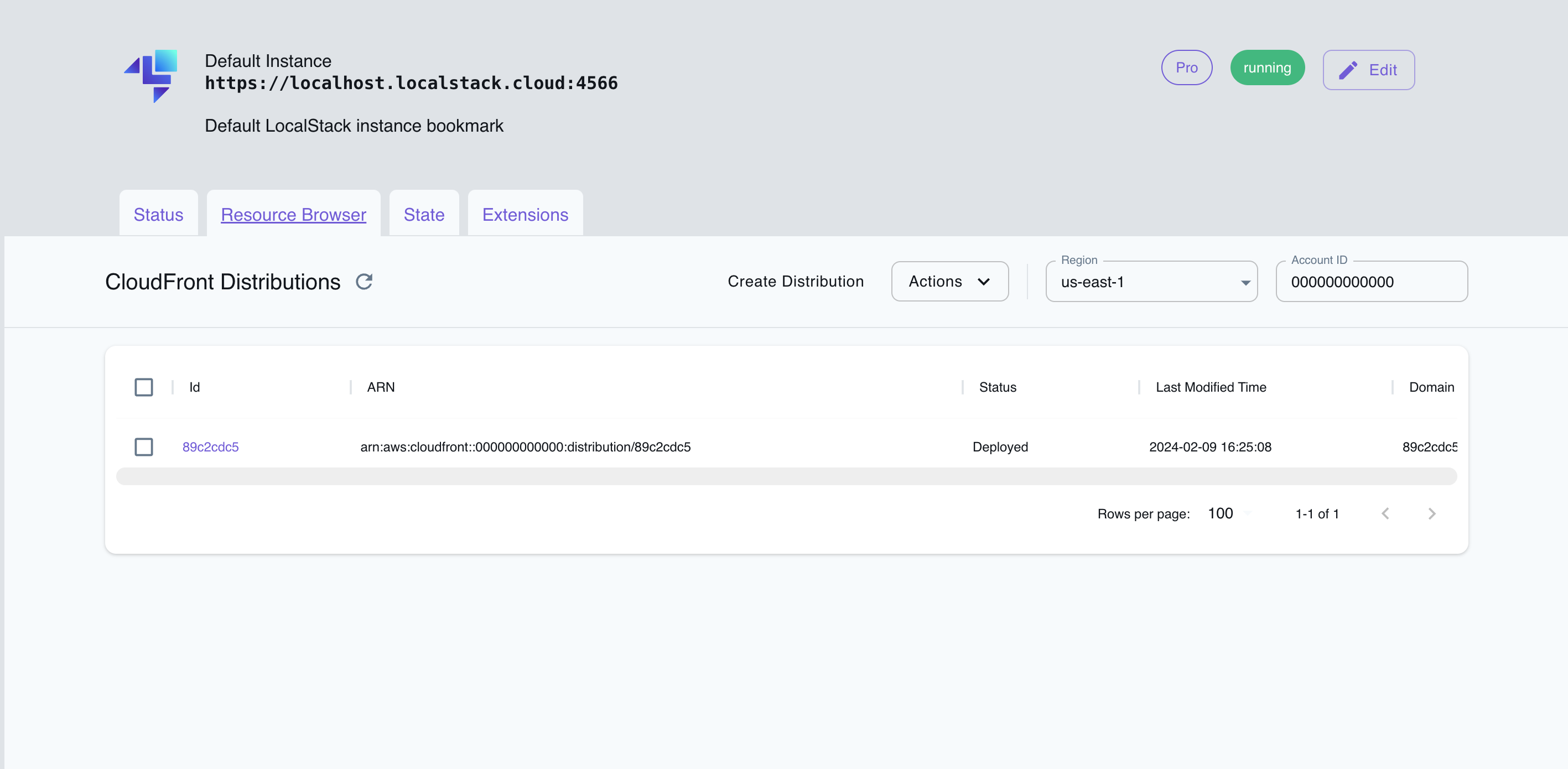
The Resource Browser allows you to perform the following actions:
- **Create Distribution**: Create a new CloudFront distribution by specifying the **Origins** and other settings.
- **List Distributions**: View a list of all CloudFront distributions.
- **Edit Distribution**: Modify the settings of an existing CloudFront distribution by opening the distribution's details page and clicking on the **Edit Distribution** button.
- **Delete Distribution**: Delete an existing CloudFront distribution by selecting the distribution, click on **Actions**, and then click on **Remove Selected**.
## Examples
The following code snippets and sample applications provide practical examples of how to use CloudFront in LocalStack for various use cases:
- [Step-up Authentication using Amazon Cognito](https://github.com/localstack/step-up-auth-sample)
## API Coverage
### CloudFront API coverage
Source service: `cloudfront`. 52 of 167 tracked operations are implemented.
Service documentation: /aws/services/cloudfront/
License availability: service entries on this page start with the Base or Ultimate plans; availability can differ by service variant. See /aws/licensing/ for current plan details.
| Operation | Status |
| --- | --- |
| AssociateAlias | Not implemented |
| AssociateDistributionTenantWebACL | Not implemented |
| AssociateDistributionWebACL | Not implemented |
| CopyDistribution | Not implemented |
| CreateAnycastIpList | Not implemented |
| CreateCachePolicy | Implemented |
| CreateCloudFrontOriginAccessIdentity | Implemented |
| CreateConnectionFunction | Not implemented |
| CreateConnectionGroup | Not implemented |
| CreateContinuousDeploymentPolicy | Not implemented |
| CreateDistribution | Implemented |
| CreateDistributionTenant | Not implemented |
| CreateDistributionWithTags | Implemented |
| CreateFieldLevelEncryptionConfig | Not implemented |
| CreateFieldLevelEncryptionProfile | Not implemented |
| CreateFunction | Implemented |
| CreateInvalidation | Implemented |
| CreateInvalidationForDistributionTenant | Not implemented |
| CreateKeyGroup | Not implemented |
| CreateKeyValueStore | Implemented |
| CreateMonitoringSubscription | Not implemented |
| CreateOriginAccessControl | Implemented |
| CreateOriginRequestPolicy | Implemented |
| CreatePublicKey | Not implemented |
| CreateRealtimeLogConfig | Not implemented |
| CreateResponseHeadersPolicy | Implemented |
| CreateStreamingDistribution | Not implemented |
| CreateStreamingDistributionWithTags | Not implemented |
| CreateTrustStore | Not implemented |
| CreateVpcOrigin | Not implemented |
| DeleteAnycastIpList | Not implemented |
| DeleteCachePolicy | Implemented |
| DeleteCloudFrontOriginAccessIdentity | Implemented |
| DeleteConnectionFunction | Not implemented |
| DeleteConnectionGroup | Not implemented |
| DeleteContinuousDeploymentPolicy | Not implemented |
| DeleteDistribution | Implemented |
| DeleteDistributionTenant | Not implemented |
| DeleteFieldLevelEncryptionConfig | Not implemented |
| DeleteFieldLevelEncryptionProfile | Not implemented |
| DeleteFunction | Implemented |
| DeleteKeyGroup | Not implemented |
| DeleteKeyValueStore | Implemented |
| DeleteMonitoringSubscription | Not implemented |
| DeleteOriginAccessControl | Implemented |
| DeleteOriginRequestPolicy | Implemented |
| DeletePublicKey | Not implemented |
| DeleteRealtimeLogConfig | Not implemented |
| DeleteResourcePolicy | Not implemented |
| DeleteResponseHeadersPolicy | Implemented |
| DeleteStreamingDistribution | Not implemented |
| DeleteTrustStore | Not implemented |
| DeleteVpcOrigin | Not implemented |
| DescribeConnectionFunction | Not implemented |
| DescribeFunction | Implemented |
| DescribeKeyValueStore | Implemented |
| DisassociateDistributionTenantWebACL | Not implemented |
| DisassociateDistributionWebACL | Not implemented |
| GetAnycastIpList | Not implemented |
| GetCachePolicy | Implemented |
| GetCachePolicyConfig | Not implemented |
| GetCloudFrontOriginAccessIdentity | Implemented |
| GetCloudFrontOriginAccessIdentityConfig | Implemented |
| GetConnectionFunction | Not implemented |
| GetConnectionGroup | Not implemented |
| GetConnectionGroupByRoutingEndpoint | Not implemented |
| GetContinuousDeploymentPolicy | Not implemented |
| GetContinuousDeploymentPolicyConfig | Not implemented |
| GetDistribution | Implemented |
| GetDistributionConfig | Implemented |
| GetDistributionTenant | Not implemented |
| GetDistributionTenantByDomain | Not implemented |
| GetFieldLevelEncryption | Not implemented |
| GetFieldLevelEncryptionConfig | Not implemented |
| GetFieldLevelEncryptionProfile | Not implemented |
| GetFieldLevelEncryptionProfileConfig | Not implemented |
| GetFunction | Implemented |
| GetInvalidation | Implemented |
| GetInvalidationForDistributionTenant | Not implemented |
| GetKeyGroup | Not implemented |
| GetKeyGroupConfig | Not implemented |
| GetManagedCertificateDetails | Not implemented |
| GetMonitoringSubscription | Not implemented |
| GetOriginAccessControl | Implemented |
| GetOriginAccessControlConfig | Implemented |
| GetOriginRequestPolicy | Implemented |
| GetOriginRequestPolicyConfig | Not implemented |
| GetPublicKey | Not implemented |
| GetPublicKeyConfig | Not implemented |
| GetRealtimeLogConfig | Not implemented |
| GetResourcePolicy | Not implemented |
| GetResponseHeadersPolicy | Implemented |
| GetResponseHeadersPolicyConfig | Not implemented |
| GetStreamingDistribution | Not implemented |
| GetStreamingDistributionConfig | Not implemented |
| GetTrustStore | Not implemented |
| GetVpcOrigin | Not implemented |
| ListAnycastIpLists | Not implemented |
| ListCachePolicies | Implemented |
| ListCloudFrontOriginAccessIdentities | Implemented |
| ListConflictingAliases | Not implemented |
| ListConnectionFunctions | Not implemented |
| ListConnectionGroups | Not implemented |
| ListContinuousDeploymentPolicies | Not implemented |
| ListDistributionTenants | Not implemented |
| ListDistributionTenantsByCustomization | Not implemented |
| ListDistributions | Implemented |
| ListDistributionsByAnycastIpListId | Not implemented |
| ListDistributionsByCachePolicyId | Not implemented |
| ListDistributionsByConnectionFunction | Not implemented |
| ListDistributionsByConnectionMode | Not implemented |
| ListDistributionsByKeyGroup | Not implemented |
| ListDistributionsByOriginRequestPolicyId | Not implemented |
| ListDistributionsByOwnedResource | Not implemented |
| ListDistributionsByRealtimeLogConfig | Not implemented |
| ListDistributionsByResponseHeadersPolicyId | Not implemented |
| ListDistributionsByTrustStore | Not implemented |
| ListDistributionsByVpcOriginId | Not implemented |
| ListDistributionsByWebACLId | Not implemented |
| ListDomainConflicts | Not implemented |
| ListFieldLevelEncryptionConfigs | Not implemented |
| ListFieldLevelEncryptionProfiles | Not implemented |
| ListFunctions | Implemented |
| ListInvalidations | Implemented |
| ListInvalidationsForDistributionTenant | Not implemented |
| ListKeyGroups | Not implemented |
| ListKeyValueStores | Implemented |
| ListOriginAccessControls | Not implemented |
| ListOriginRequestPolicies | Implemented |
| ListPublicKeys | Not implemented |
| ListRealtimeLogConfigs | Not implemented |
| ListResponseHeadersPolicies | Implemented |
| ListStreamingDistributions | Not implemented |
| ListTagsForResource | Implemented |
| ListTrustStores | Not implemented |
| ListVpcOrigins | Not implemented |
| PublishConnectionFunction | Not implemented |
| PublishFunction | Implemented |
| PutResourcePolicy | Not implemented |
| TagResource | Implemented |
| TestConnectionFunction | Not implemented |
| TestFunction | Implemented |
| UntagResource | Implemented |
| UpdateAnycastIpList | Not implemented |
| UpdateCachePolicy | Implemented |
| UpdateCloudFrontOriginAccessIdentity | Implemented |
| UpdateConnectionFunction | Not implemented |
| UpdateConnectionGroup | Not implemented |
| UpdateContinuousDeploymentPolicy | Not implemented |
| UpdateDistribution | Implemented |
| UpdateDistributionTenant | Not implemented |
| UpdateDistributionWithStagingConfig | Not implemented |
| UpdateDomainAssociation | Not implemented |
| UpdateFieldLevelEncryptionConfig | Not implemented |
| UpdateFieldLevelEncryptionProfile | Not implemented |
| UpdateFunction | Implemented |
| UpdateKeyGroup | Not implemented |
| UpdateKeyValueStore | Implemented |
| UpdateOriginAccessControl | Implemented |
| UpdateOriginRequestPolicy | Implemented |
| UpdatePublicKey | Not implemented |
| UpdateRealtimeLogConfig | Not implemented |
| UpdateResponseHeadersPolicy | Implemented |
| UpdateStreamingDistribution | Not implemented |
| UpdateTrustStore | Not implemented |
| UpdateVpcOrigin | Not implemented |
| VerifyDnsConfiguration | Not implemented |