# Lambda
Source: /aws/services/lambda/
## Introduction
AWS Lambda is a Serverless Function as a Service (FaaS) platform that lets you run code in your preferred programming language on the AWS ecosystem.
AWS Lambda automatically scales your code to meet demand and handles server provisioning, management, and maintenance.
AWS Lambda allows you to break down your application into smaller, independent functions that integrate seamlessly with AWS services.
LocalStack allows you to use the Lambda APIs to create, deploy, and test your Lambda functions.
The supported APIs are available on our [API coverage section](#api-coverage), which provides information on the extent of Lambda's integration with LocalStack.
## Getting started
This guide is designed for users new to Lambda and assumes basic knowledge of the AWS CLI and our [`lstk aws`](/aws/developer-tools/running-localstack/lstk/cloud-and-iac-commands/#aws) command.
Start your LocalStack container using your preferred method.
We will demonstrate how to create a Lambda function with a Function URL.
With the Function URL property, you can call a Lambda Function via an HTTP API call.
### Create a Lambda function
To create a new Lambda function, create a new file called `index.js` with the following code:
```javascript showshowLineNumbers
exports.handler = async (event) => {
let body = JSON.parse(event.body)
const product = body.num1 * body.num2;
const response = {
statusCode: 200,
body: "The product of " + body.num1 + " and " + body.num2 + " is " + product,
};
return response;
};
```
Enter the following command to create a new Lambda function:
```bash
zip function.zip index.js
lstk aws lambda create-function \
--function-name localstack-lambda-url-example \
--runtime nodejs22.x \
--zip-file fileb://function.zip \
--handler index.handler \
--role arn:aws:iam::000000000000:role/lambda-role
```
:::note
To create a predictable URL for the function, you can assign a custom ID by specifying the `_custom_id_` tag on the function itself.
```bash
lstk aws lambda create-function \
--function-name localstack-lambda-url-example \
--runtime nodejs22.x \
--zip-file fileb://function.zip \
--handler index.handler \
--role arn:aws:iam::000000000000:role/lambda-role \
--tags '{"_custom_id_":"my-custom-subdomain"}'
```
You must specify the `_custom_id_` tag **before** creating a Function URL.
After the URL configuration is set up, any modifications to the tag will not affect it.
LocalStack supports assigning custom IDs to both the `$LATEST` version of the function or to an existing version alias.
:::
:::note
In the old Lambda provider, you could create a function with any arbitrary string as the role, such as `r1`.
However, the new provider requires the role ARN to be in the format `arn:aws:iam::000000000000:role/lambda-role` and validates it using an appropriate regex. However, it currently does not check whether the role exists.
:::
### Invoke the Function
To invoke the Lambda function, you can use the [`Invoke` API](https://docs.aws.amazon.com/lambda/latest/dg/API_Invoke.html).
Run the following command to invoke the function:
```bash
lstk aws lambda invoke --function-name localstack-lambda-url-example \
--payload '{"body": "{\"num1\": \"10\", \"num2\": \"10\"}" }' output.txt
```
```bash
lstk aws lambda invoke --function-name localstack-lambda-url-example \
--cli-binary-format raw-in-base64-out \
--payload '{"body": "{\"num1\": \"10\", \"num2\": \"10\"}" }' output.txt
```
### Create a Function URL
:::note
[Response streaming](https://docs.aws.amazon.com/lambda/latest/dg/configuration-response-streaming.html) is currently not supported, so it will still return a synchronous/full response instead.
:::
With the Function URL property, there is now a new way to call a Lambda Function via HTTP API call using the [`CreateFunctionURLConfig` API](https://docs.aws.amazon.com/lambda/latest/dg/API_CreateFunctionUrlConfig.html).
To create a URL for invoking the function, run the following command:
```bash
lstk aws lambda create-function-url-config \
--function-name localstack-lambda-url-example \
--auth-type NONE
```
This will generate a HTTP URL that can be used to invoke the Lambda function.
The URL will be in the format `http://.lambda-url.us-east-1.localhost.localstack.cloud:4566`.
:::note
As previously mentioned, when a Lambda Function has a `_custom_id_` tag, LocalStack sets this tag's value as the subdomain in the Function's URL.
```bash
lstk aws lambda create-function-url-config \
--function-name localstack-lambda-url-example \
--auth-type NONE
```
```bash title="Output"
{
"FunctionUrl": "http://my-custom-subdomain.lambda-url....",
....
}
```
In addition, if you pass an existing version alias as a `Qualifier` to the request, the created URL will combine the custom ID and the alias in the form `-`.
```bash
lstk aws lambda create-function-url-config \
--function-name localstack-lambda-url-example \
--auth-type NONE
--qualifier test-alias
```
```bash title="Output"
{
"FunctionUrl": "http://my-custom-subdomain-test-alias.lambda-url....",
....
}
```
:::
### Trigger the Lambda function URL
You can now trigger the Lambda function by sending a HTTP POST request to the URL using [curl](https://curl.se/) or your REST HTTP client:
```bash
curl -X POST \
'http://.lambda-url.us-east-1.localhost.localstack.cloud:4566/' \
-H 'Content-Type: application/json' \
-d '{"num1": "10", "num2": "10"}'
```
```bash title="Output"
The product of 10 and 10 is 100%
```
## Lambda Event Source Mappings
[Lambda event source mappings](https://docs.aws.amazon.com/lambda/latest/dg/invocation-eventsourcemapping.html) allows you to connect Lambda functions to other AWS services.
The following event sources are supported in LocalStack:
- [Simple Queue Service (SQS)](https://docs.aws.amazon.com/lambda/latest/dg/with-sqs.html)
- [DynamoDB](https://docs.aws.amazon.com/lambda/latest/dg/with-ddb.html)
- [Kinesis](https://docs.aws.amazon.com/lambda/latest/dg/with-kinesis.html)
- [Managed Streaming for Apache Kafka (MSK)](https://docs.aws.amazon.com/lambda/latest/dg/with-msk.html) ⭐️
- [Self-Managed Apache Kafka](https://docs.aws.amazon.com/lambda/latest/dg/with-kafka.html) ⭐️
### Behaviour Coverage
The table below shows feature coverage for all supported event sources for the latest version of LocalStack.
Unlike [API operation coverage](#api-coverage), this table illustrates the **functional and behavioural coverage** of LocalStack's Lambda Event Source Mapping implementation.
Where necessary, footnotes are used to provide additional context.
:::note
Feature availability and coverage is categorized with the following system:
- ⭐️ Only Available in LocalStack licensed editions
- 🟢 Fully Implemented
- 🟡 Partially Implemented
- 🟠 Not Implemented
- ➖ Not Applicable (Not Supported by AWS)
:::
Parameter
Description
SQS
Stream
Kafka ⭐️
Standard
FIFO
Kinesis
DynamoDB
Amazon MSK
Self-Managed
BatchSize
Batching events by count.
🟢
🟢
🟢
🟢
🟢
🟢
Not Configurable
Batch when ≥ 6 MB limit.
🟠
🟠
🟠
🟠
🟢
🟢
MaximumBatchingWindowInSeconds
Batch by Time Window.
🟢
🟢
🟢
🟢
🟢
🟢
MaximumRetryAttempts
Discard after N retries.
➖
➖
🟢
🟢
➖
➖
MaximumRecordAgeInSeconds
Discard records older than time `t`.
➖
➖
🟢
🟢
➖
➖
Enabled
Enabling/Disabling.
🟢
🟢
🟢
🟢
🟢
🟢
FilterCriteria
Filter pattern evaluating. [^1] [^2]
🟢
🟢
🟢
🟢
🟢
🟢
FunctionResponseTypes
Enabling ReportBatchItemFailures.
🟢
🟢
🟢
🟢
🟠
🟠
BisectBatchOnFunctionError
Bisect a batch on error and retry.
➖
➖
🟠
🟠
➖
➖
ScalingConfig
The scaling configuration for the event source. [^3]
🟢
🟡
➖
➖
➖
➖
ParallelizationFactor
Parallel batch processing by shard.
➖
➖
🟠
🟠
➖
➖
DestinationConfig.OnFailure
SQS Failure Destination.
➖
➖
🟢
🟢
🟠
🟠
SNS Failure Destination.
➖
➖
🟢
🟢
🟠
🟠
S3 Failure Destination.
➖
➖
🟢
🟢
🟠
🟠
DestinationConfig.OnSuccess
Success Destinations.
➖
➖
➖
➖
➖
➖
MetricsConfig
CloudWatch metrics.
🟠
🟠
🟠
🟠
🟠
🟠
ProvisionedPollerConfig
Control throughput via min-max limits. [^4]
🟡
🟡
➖
➖
🟠
🟠
StartingPosition
Position to start reading from.
➖
➖
🟢
🟢
🟢
🟢
StartingPositionTimestamp
Timestamp to start reading from.
➖
➖
🟢
➖
🟢
🟢
TumblingWindowInSeconds
Duration (seconds) of a processing window.
➖
➖
🟠
🟠
➖
➖
Topics ⭐️
Kafka topics to read from.
➖
➖
➖
➖
🟢
🟢
[^1]: Read more at [Control which events Lambda sends to your function](https://docs.aws.amazon.com/lambda/latest/dg/invocation-eventfiltering.html)
[^2]: The available Metadata properties may not have full parity with AWS depending on the event source (read more at [Understanding event filtering basics](https://docs.aws.amazon.com/lambda/latest/dg/invocation-eventfiltering.html#filtering-basics)).
[^3]: For SQS Standard, LocalStack spawns multiple concurrent pollers per event source mapping (`LAMBDA_EVENT_SOURCE_MAPPING_SQS_POLLER_COUNT`, default `5`), and `ScalingConfig.MaximumConcurrency` caps the poller count when set. For SQS FIFO, a single poller is always used to preserve message-group ordering, so the scaling configuration is accepted but has no effect.
[^4]: For SQS Standard, only `MinimumPollers` is honored (it sets the poller count); `MaximumPollers` has no effect. For SQS FIFO, the single-poller model means the configuration is accepted but ignored.
Create a [GitHub Discussion](https://github.com/orgs/localstack/discussions/new/choose) or reach out to [LocalStack Support](/aws/help-support/get-help/) if you experience any challenges.
## Lambda Layers
[Lambda layers](https://docs.aws.amazon.com/lambda/latest/dg/configuration-layers.html) let you include additional code and dependencies in your Lambda functions.
With a valid LocalStack license, you can deploy Lambda Layers locally to streamline your development and testing process.
### Creating and using a Lambda Layer Locally
To create a Lambda Layer locally, you can use the [`PublishLayerVersion` API](https://docs.aws.amazon.com/lambda/latest/dg/API_PublishLayerVersion.html) in LocalStack.
Here's a simple example using Python:
```bash
mkdir -p /tmp/python/
echo 'def util():' > /tmp/python/testlayer.py
echo ' print("Output from Lambda layer util function")' >> /tmp/python/testlayer.py
(cd /tmp; zip -r testlayer.zip python)
LAYER_ARN=$(lstk aws lambda publish-layer-version --layer-name layer1 --zip-file fileb:///tmp/testlayer.zip | jq -r .LayerVersionArn)
```
Next, define a Lambda function that uses our layer:
```bash
echo 'def handler(*args, **kwargs):' > /tmp/testlambda.py
echo ' import testlayer; testlayer.util()' >> /tmp/testlambda.py
echo ' print("Debug output from Lambda function")' >> /tmp/testlambda.py
(cd /tmp; zip testlambda.zip testlambda.py)
lstk aws lambda create-function \
--function-name func1 \
--runtime python3.8 \
--role arn:aws:iam::000000000000:role/lambda-role \
--handler testlambda.handler \
--timeout 30 \
--zip-file fileb:///tmp/testlambda.zip \
--layers $LAYER_ARN
```
Here, we've defined a Lambda function called `handler()` that imports the `util()` function from our `layer1` Lambda Layer.
We then used the [`CreateFunction` API](https://docs.aws.amazon.com/lambda/latest/dg/API_CreateFunction.html) to create this Lambda function in LocalStack, specifying the `layer1` Lambda Layer as a dependency.
To test our Lambda function and see the output from the Lambda Layer, we can invoke the function and check the logs (with `DEBUG=1` enabled).
Here's an example:
```bash title="Output"
> START RequestId: a8bc4ce6-e2e8-189e-cf58-c2eb72827c23 Version: $LATEST
> Output from Lambda layer util function
> Debug output from Lambda function
> END RequestId: a8bc4ce6-e2e8-189e-cf58-c2eb72827c23
```
### Referencing Lambda layers from AWS
If your Lambda function references a layer in real AWS, you can integrate it into your local dev environment by making it accessible to the `886468871268` AWS account ID.
This account is managed by LocalStack on AWS.
To grant access to your layer, run the following command:
```bash
aws lambda add-layer-version-permission \
--layer-name test-layer \
--version-number 1 \
--statement-id layerAccessFromLocalStack \
--principal 886468871268 \
--action lambda:GetLayerVersion
```
Replace `test-layer` and `1` with the name and version number of your layer, respectively.
After granting access, the next time you reference the layer in one of your local Lambda functions using the AWS Lambda layer ARN, the layer will be automatically pulled down and integrated into your local dev environment.
## Lambda Managed Instances
LocalStack provides local testing support for Lambda Managed Instances. We support all of the new APIs, as well as the CloudFormation and Terraform resource types. All the same configuration is therefore possible on your local machine, without needing to modify your infrastructure as code (IaC).
:::note
This is an evolving feature and current support is scoped as follows:
- We **do not spin up any additional EC2 instances**. LocalStack runs Lambda functions in containers on your local machine.
- **Multi-concurrency support is not yet available.** This feature is planned for a future release (target: 2026). Currently, each parallel Lambda invocation is served by a separate container.
- **IAM Permissions are not enforced.** A Capacity Provider is configured with an Operator Role, but the permissions are not enforced by LocalStack. It’s important you check the AWS documentation to ensure you’ve configured this role correctly.
:::
## Lambda Durable Functions
[Lambda Durable Functions](https://docs.aws.amazon.com/lambda/latest/dg/durable-functions.html) run checkpointed, replayable workflows that can continue for up to one year.
LocalStack supports durable executions for Node.js 22 and 24, Python 3.13 and 3.14, Java 17, 21, and 25, and .NET 8 and 10.
### Create and invoke a durable function
Install the JavaScript durable execution SDK and include it with the function's deployment package:
```bash
npm install --silent @aws/durable-execution-sdk-js
zip -qr function.zip index.mjs node_modules package.json package-lock.json
```
Create `index.mjs` with a checkpointed step followed by a one-second durable wait:
```javascript title="index.mjs" showLineNumbers
export const handler = withDurableExecution(async (event, context) => {
const result = await context.step(async () => ({
message: `Hello, ${event.name}!`,
}));
await context.wait({ seconds: 1 });
return result;
});
```
Create the function with a five-minute execution timeout and seven-day retention period:
```bash
lstk aws lambda create-function \
--function-name durable-hello \
--runtime nodejs22.x \
--handler index.handler \
--role arn:aws:iam::000000000000:role/lambda-role \
--zip-file fileb://function.zip \
--timeout 30 \
--durable-config '{"ExecutionTimeout":300,"RetentionPeriodInDays":7}'
```
```bash title="Output"
{
"FunctionName": "durable-hello",
"FunctionArn": "arn:aws:lambda:us-east-1:000000000000:function:durable-hello",
"Runtime": "nodejs22.x",
"State": "Pending",
"DurableConfig": {
"RetentionPeriodInDays": 7,
"ExecutionTimeout": 300
}
}
```
Wait for the function to become active:
```bash
lstk aws lambda wait function-active-v2 --function-name durable-hello
```
Create `event.json`:
```json title="event.json"
{
"name": "LocalStack"
}
```
Start an asynchronous durable execution.
Use a qualified function target and a durable execution name, which acts as an idempotency key:
```bash
EXECUTION_ARN=$(lstk aws lambda invoke \
--function-name durable-hello \
--qualifier '$LATEST' \
--invocation-type Event \
--durable-execution-name hello-docs \
--payload fileb://event.json \
response.json \
| jq -r '.DurableExecutionArn')
echo "$EXECUTION_ARN"
```
```text title="Output"
arn:aws:lambda:us-east-1:000000000000:function:durable-hello:$LATEST/durable-execution/hello-docs/
```
After the execution finishes, retrieve its status and result:
```bash
lstk aws lambda get-durable-execution \
--durable-execution-arn "$EXECUTION_ARN" \
--query '{DurableExecutionName:DurableExecutionName,Status:Status,Result:Result,DurableConfig:DurableConfig}'
```
```bash title="Output"
{
"DurableExecutionName": "hello-docs",
"Status": "SUCCEEDED",
"Result": "{\"message\":\"Hello, LocalStack!\"}",
"DurableConfig": {
"RetentionPeriodInDays": 7,
"ExecutionTimeout": 300
}
}
```
Inspect the execution history to see the checkpoint, suspension, replay, and completion:
```bash
lstk aws lambda get-durable-execution-history \
--durable-execution-arn "$EXECUTION_ARN" \
--query 'Events[].EventType'
```
```bash title="Output"
[
"ExecutionStarted",
"StepStarted",
"StepSucceeded",
"WaitStarted",
"InvocationCompleted",
"WaitSucceeded",
"InvocationCompleted",
"ExecutionSucceeded"
]
```
### Supported behaviors
LocalStack supports the following durable workflow behaviors:
- Synchronous and asynchronous durable invocations with named, idempotent executions.
- Checkpointed steps, waits, condition polling, and step retries.
- Callbacks with heartbeats, success and failure responses, and restart-safe timeouts.
- Chained Lambda invocations, parallel branches, maps, and child contexts.
- Execution history, stopping and draining executions, retention, persistence, and asynchronous dead-letter queue delivery.
- Function URL and event source mapping dispatch to durable functions, subject to the AWS execution-time constraints.
### Current Limitations
:::note
LocalStack Lambda runtime images do not include the durable execution SDK.
Package the SDK and its dependencies with every durable function deployment artifact.
This differs from AWS managed Node.js and Python runtimes, which include the SDK for testing and development.
:::
LocalStack currently has the following limitations:
- `KMSKeyArn` is validated, stored, merged, and returned, but LocalStack does not use the key to encrypt durable execution data.
- LocalStack does not emit durable execution monitoring events to CloudWatch or EventBridge.
- LocalStack does not enforce API request-per-second throttling or the account-level running-executions quota.
- LocalStack enforces the checkpoint protocol limits, including 3,000 operations and 100 MB of written state per execution.
[Lambda Debug Mode](/aws/developer-tools/lambda-tools/remote-debugging/#lambda-debug-mode-preview-) supports durable executions.
Replays use the debug environment pinned to the execution, and LocalStack defers `ExecutionTimeout` while execution is paused at a breakpoint.
## LocalStack Lambda Runtime Interface Emulator (RIE)
LocalStack uses a [custom implementation](https://github.com/localstack/lambda-runtime-init/) of the
[AWS Lambda Runtime Interface Emulator](https://github.com/aws/aws-lambda-runtime-interface-emulator)
to match the behavior of AWS Lambda as closely as possible while providing additional features
such as [hot reloading](/aws/developer-tools/lambda-tools/hot-reloading).
We ship our custom implementation as a Golang binary, which gets copied into each Lambda container under `/var/rapid/init`.
This init binary is used as the entry point for every Lambda container.
Our custom implementation offers additional configuration options,
but these configurations are primarily intended for LocalStack developers and could change in the future.
The LocalStack [configuration](/aws/customization/configuration-options) `LAMBDA_DOCKER_FLAGS` can be used to configure all Lambda containers,
for example `LAMBDA_DOCKER_FLAGS=-e LOCALSTACK_INIT_LOG_LEVEL=debug`.
Some noteworthy configurations include:
- `LOCALSTACK_INIT_LOG_LEVEL` defines the log level of the Golang binary.
Values: `trace`, `debug`, `info`, `warn` (default), `error`, `fatal`, `panic`
- `LOCALSTACK_USER` defines the system user executing the Lambda runtime.
Values: `sbx_user1051` (default), `root` (skip dropping root privileges)
The full list of configurations is defined in the Golang function
[InitLsOpts](https://github.com/localstack/lambda-runtime-init/blob/localstack/cmd/localstack/main.go#L43).
### Proxy configuration
Lambda execution environments communicate back to the LocalStack container for runtime APIs, credentials, logs, and calls to emulated AWS services.
If your host, Docker daemon, or Kubernetes cluster injects `http_proxy` or `https_proxy` into Lambda containers, that internal traffic must bypass the proxy.
LocalStack automatically adds the configured `LOCALSTACK_HOST` host, and the runtime `LOCALSTACK_HOSTNAME` when present, to the Lambda execution environment's `no_proxy` variable.
If your function already defines `no_proxy`, LocalStack preserves the existing entries and prepends the LocalStack hosts.
In Kubernetes deployments, make sure admission controllers or proxy-injection policies do not overwrite the `no_proxy` value after LocalStack creates Lambda pods.
If your cluster-level policy manages `no_proxy`, include the LocalStack host used by your deployment, for example `localhost.localstack.cloud` or the host configured through `LOCALSTACK_HOST`.
## Special Tools
LocalStack provides various tools to help you develop, debug, and test your AWS Lambda functions more efficiently.
- **Hot reloading**: With Lambda hot reloading, you can continuously apply code changes to your Lambda functions without needing to redeploy them manually.
To learn more about how to use hot reloading with LocalStack, check out our [hot reloading documentation](/aws/developer-tools/lambda-tools/hot-reloading).
- **Remote debugging**: LocalStack's remote debugging functionality allows you to attach a debugger to your Lambda function using your preferred IDE.
To get started with remote debugging in LocalStack, see our [debugging documentation](/aws/developer-tools/lambda-tools/remote-debugging).
- **Lambda VS Code Extension**: LocalStack's Lambda VS Code Extension supports deploying and invoking Python Lambda functions through AWS SAM or AWS CloudFormation.
To get started with the Lambda VS Code Extension, see our [Lambda VS Code Extension documentation](/aws/connecting/ides/vscode-extension).
- **API for querying Lambda runtimes**: LocalStack offers a metadata API to query the list of Lambda runtimes via `GET http://localhost.localstack.cloud:4566/_aws/lambda/runtimes`.
It returns the [Supported Runtimes](https://docs.aws.amazon.com/lambda/latest/dg/lambda-runtimes.html) matching AWS parity (i.e., excluding deprecated runtimes) and offers additional filters for `deprecated` runtimes and `all` runtimes (`GET /_aws/lambda/runtimes?filter=all`).
## Resource Browser
The LocalStack Web Application provides a [Resource Browser](/aws/connecting/console/resource-browser) for managing Lambda resources.
You can access the Resource Browser by opening the LocalStack Web Application in your browser, navigating to the **Resources** section, and then clicking on **Lambda** under the **Compute** section.
The Resource Browser displays Functions and Layers resources.
You can click on individual resources to view their details.
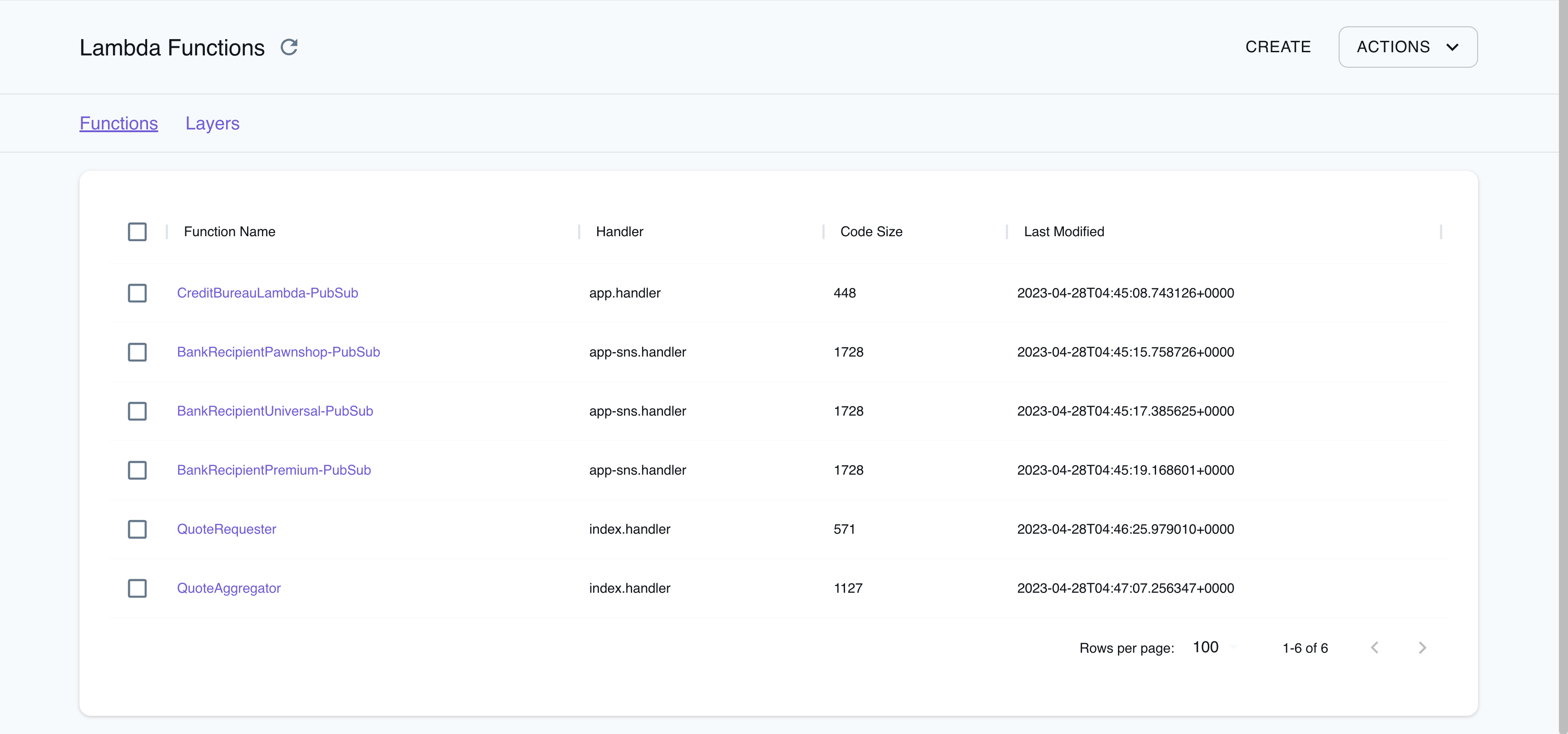
The Resource Browser allows you to perform the following actions:
- **Create Functions & Layers**: Create a new Lambda function or a new Lambda Layer by clicking on **Create API** button on top-right and creating a new configuration by clicking on **Submit** button.
- **View Function & Layer Details**: Click on any function or layer to view detailed information such as the resource's name, ARN, runtime, handler, and more.
You can also navigate across different versions of the resource.
- **Delete Functions & Layers**: To delete a function or layer, select the resource from the Resource Browser, click on the **Remove Selected** button at the top-right of the screen, and confirm the deletion by clicking on the **Continue** button.
## Migrating to Lambda v2
:::note
The legacy Lambda implementation has been removed since LocalStack 3.0 (Docker `latest` since 2023-11-09).
:::
As part of the [LocalStack 2.0 release](https://discuss.localstack.cloud/t/new-lambda-implementation-in-localstack-2-0/258), the Lambda provider has been migrated to `v2` (formerly known as `asf`).
With the new implementation, the following changes have been introduced:
- To run Lambda functions in LocalStack, mount the Docker socket into the LocalStack container.
Add the following Docker volume mount to your LocalStack startup configuration: `/var/run/docker.sock:/var/run/docker.sock`.
You can find an example of this configuration in our official [`docker-compose.yml` file](/aws/getting-started/installation/#docker-compose).
- The `v2` provider discontinues Lambda Executor Modes such as `LAMBDA_EXECUTOR=local`.
Previously, this mode was used as a fallback when the Docker socket was unavailable in the LocalStack container, but many users unintentionally used it instead of the configured `LAMBDA_EXECUTOR=docker`.
The new provider now behaves similarly to the old `docker-reuse` executor and does not require such configuration.
- The Lambda containers are now reused between invocations.
The changes made to the filesystem (such as in `/tmp`) will persist between subsequent invocations if the function is dispatched to the same container.
This is known as a **warm start** (see [Operating Lambda](https://aws.amazon.com/blogs/compute/operating-lambda-performance-optimization-part-1/) for more information).
To ensure that each invocation starts with a fresh container, you can set the `LAMBDA_KEEPALIVE_MS` configuration option to 0 milliseconds, to force **cold starts**.
- The platform uses [official Docker base images](https://docs.aws.amazon.com/lambda/latest/dg/runtimes-images.html) pulled from `public.ecr.aws/lambda/`, instead of `lambci`, and supports both `arm64` and `x86_64` architectures.
The Lambda functions filesystem now matches the AWS Lambda production environment.
The ARM containers for compatible runtimes are based on Amazon Linux 2, and ARM-compatible hosts can create functions with the `arm64` architecture.
- Lambda functions in LocalStack resolve AWS domains, such as `s3.amazonaws.com`, to the LocalStack container.
This domain resolution is DNS-based and can be disabled by setting `DNS_ADDRESS=0`.
For more information, refer to [Transparent Endpoint Injection](/aws/customization/networking/transparent-endpoint-injection).
Previously, LocalStack provided patched AWS SDKs to redirect AWS API calls transparently to LocalStack.
- The new provider may generate more exceptions due to invalid input.
For instance, while the old provider accepted arbitrary strings (such as `r1`) as Lambda roles when creating a function, the new provider validates role ARNs using a regular expression that requires them to be in the format `arn:aws:iam::000000000000:role/lambda-role`.
However, it currently does not verify whether the role actually exists.
- The new Lambda provider now follows the [AWS Lambda state model](https://aws.amazon.com/blogs/compute/tracking-the-state-of-lambda-functions/), while creating and updating Lambda functions, which allows for asynchronous processing.
Functions are always created in the `Pending state` and move to `Active` once they are ready to accept invocations.
Previously, the functions were created synchronously by blocking until the function state was active.
The configuration `LAMBDA_SYNCHRONOUS_CREATE=1` can force synchronous function creation, but it is not recommended.
- LocalStack's Lambda implementation, allows you to customize the Lambda execution environment using the [Lambda Extensions API](https://docs.aws.amazon.com/lambda/latest/dg/runtimes-extensions-api.html).
This API allows for advanced monitoring, observability, or developer tooling, providing greater control and flexibility over your Lambda functions.
Lambda functions can also be run on hosts with [multi-architecture support](/aws/customization/advanced/arm64-support/), allowing you to leverage LocalStack's Lambda API to develop and test Lambda functions with high parity.
The following configuration options from the old provider are discontinued in the new provider:
- The `LAMBDA_EXECUTOR` and specifically, the `LAMBDA_EXECUTOR=local` options are no longer supported.
- The `LAMBDA_STAY_OPEN_MODE` is now the default behavior and can be removed.
Instead, use the `LAMBDA_KEEPALIVE_MS` option to configure how long containers should be kept running in between invocations.
- The `LAMBDA_REMOTE_DOCKER` option is not used anymore since the new provider automatically copies zip files and configures hot reloading.
- The `LAMBDA_CODE_EXTRACT_TIME` option is no longer used because function creation is now asynchronous.
- The `LAMBDA_FALLBACK_URL`, `SYNCHRONOUS_KINESIS_EVENTS`, `SYNCHRONOUS_SNS_EVENTS` and `LAMBDA_FORWARD_URL` options are currently not supported.
- The `LAMBDA_CONTAINER_REGISTRY` option is not used anymore.
Instead, use the more flexible `LAMBDA_RUNTIME_IMAGE_MAPPING` option to customize individual runtimes.
- The `LAMBDA_XRAY_INIT` option is no longer needed because the X-Ray daemon is always initialized.
However, the new provider still supports the following configuration options:
- The `BUCKET_MARKER_LOCAL` option has a new default value, `hot-reload`.
The former default value `__local__` is an invalid bucket name.
- The `LAMBDA_TRUNCATE_STDOUT` option.
- The `LAMBDA_DOCKER_NETWORK` option.
- The `LAMBDA_DOCKER_FLAGS` option.
- The `LAMBDA_REMOVE_CONTAINERS` option.
- The `LAMBDA_DOCKER_DNS` option since LocalStack 2.2.
- The `HOSTNAME_FROM_LAMBDA` option since LocalStack 3.0.
## Examples
The following code snippets and sample applications provide practical examples of how to use Lambda in LocalStack for various use cases:
- [Lambda Debugging](/aws/developer-tools/lambda-tools/remote-debugging) demonstrates how to remotely debug a Lambda function from within your IDE.
- [Debug your Python Lambda Function](https://github.com/localstack-samples/localstack-pro-samples/tree/master/lambda-debugging-sam-python)
- [Debug your JavaScript Lambda Function](https://github.com/localstack-samples/localstack-pro-samples/tree/master/lambda-debugging-sam-javascript)
- [Debug your TypeScript Lambda Function](https://github.com/localstack-samples/localstack-pro-samples/tree/master/lambda-debugging-sam-typescript)
- [Debug your Java Lambda Function](https://github.com/localstack-samples/localstack-pro-samples/tree/master/lambda-debugging-sam-java)
- [Lambda Hot Reloading](https://github.com/localstack/localstack-pro-samples/tree/master/lambda-hot-reloading) shows how to use hot reloading to update function code and layers without having to redeploy them.
- [Lambda Function URL](https://github.com/localstack-samples/localstack-pro-samples/tree/master/lambda-function-urls-javascript) shows how to use HTTP to invoke a Lambda function via its Function URL.
- [Lambda Layers](https://github.com/localstack/localstack-pro-samples/blob/master/serverless-lambda-layers) demonstrates how to use Lambda layers, which are reusable packages of code that can be shared across multiple functions.
- [Lambda PHP/Bref](https://github.com/localstack/localstack-pro-samples/tree/master/lambda-php-bref-cdk-app) shows how to use PHP/Bref with and without fpm, using the Serverless framework and AWS CDK.
- [Lambda Container Images](https://github.com/localstack/localstack-pro-samples/tree/master/lambda-container-image) demonstrates how to use Lambda functions packaged as container images, which can be built using Docker and pushed to a local ECR registry.
- [Lambda X-Ray](https://github.com/localstack/localstack-pro-samples/tree/master/lambda-xray) shows how to instrument Lambda functions for X-Ray using Powertools and the X-Ray SDK.
## Troubleshooting
### Docker not available
In the old Lambda provider, Lambda functions were executed within the LocalStack container using the local executor mode.
This mode was used as a fallback if the Docker socket was unavailable in the LocalStack container.
However, many users inadvertently used the local executor mode instead of the intended Docker executor mode, which caused unexpected behavior.
If you encounter the following error message, you may be using the local executor mode:
```bash
Lambda 'arn:aws:lambda:us-east-1:000000000000:function:my-function:$LATEST' changed to failed.
Reason: Docker not available
...
raise DockerNotAvailable("Docker not available")
```
```bash
An error occurred (ResourceConflictException) when calling the Invoke operation (reached max retries: 0): The operation cannot be performed at this time.
The function is currently in the following state: Failed
```
```bash
Error: Failed to create/update the stack: sam-app, Waiter StackCreateComplete failed: Waiter encountered a terminal failure state: For expression "Stacks[].StackStatus" we matched expected path: "CREATE_FAILED" at least once
```
To fix this issue, add the Docker volume mount `/var/run/docker.sock:/var/run/docker.sock` to your LocalStack startup.
Refer to our [sample `docker-compose.yml` file](https://github.com/localstack/localstack/blob/main/docker-compose.yml) as an example.
### Function in Pending state
If you receive a `ResourceConflictException` when trying to invoke a function, it is currently in a `Pending` state and cannot be executed yet.
```bash
lstk aws lambda get-function --function-name my-function
```
```bash title="Output"
An error occurred (ResourceConflictException) when calling the Invoke operation (reached max retries: 0):
The operation cannot be performed at this time.
The function is currently in the following state: Pending
```
To wait until the function becomes `active`, you can use the following command:
```bash
lstk aws lambda wait function-active-v2 --function-name my-function
```
Alternatively, you can check the function state using the [`GetFunction` API](https://docs.aws.amazon.com/lambda/latest/dg/API_GetFunction.html):
```bash
lstk aws lambda get-function --function-name my-function
```
```bash title="Output"
{
"Configuration": {
...
"RevisionId": "c61d6139-1441-4ad5-983a-5a1cec7a1847",
"State": "Pending",
"StateReason": "The function is being created.",
"StateReasonCode": "Creating",
...
}
}
```
When the function is active, the output will be similar to the following:
```bash
lstk aws lambda get-function --function-name my-function
```
```bash title="Output"
{
"Configuration": {
...
"RevisionId": "c6633a28-b8d2-40f7-b8e1-02f6f32e8473",
"State": "Active",
"LastUpdateStatus": "Successful",
...
}
}
```
If the function is still in the `Pending` state, the output will include a `"State": "Pending"` field and a `"StateReason": "The function is being created."` message.
Once the function is active, the `"State"` field will change to `"Active"` and the `"LastUpdateStatus"` field will indicate the status of the last update.
### Not implemented error
If you are using LocalStack versions prior to 2.0, and encounter a `NotImplementedError` in the LocalStack logs and an `InternalFailure (501) error` in the client while creating a Lambda function using the [`CreateFunction` API](https://docs.aws.amazon.com/lambda/latest/dg/API_CreateFunction.html), check your `PROVIDER_OVERRIDE_LAMBDA` configuration.
You might encounter this error if it is set to `legacy`.
## API Coverage
### Lambda API coverage
Source service: `lambda`. 81 of 88 tracked operations are implemented.
Service documentation: /aws/services/lambda/
License availability: available starting with the Hobby plan. See /aws/licensing/ for current plan details.
| Operation | Status |
| --- | --- |
| AddLayerVersionPermission | Implemented |
| AddPermission | Implemented |
| CheckpointDurableExecution | Implemented |
| CreateAlias | Implemented |
| CreateCapacityProvider | Implemented |
| CreateCodeSigningConfig | Implemented |
| CreateEventSourceMapping | Implemented |
| CreateFunction | Implemented |
| CreateFunctionUrlConfig | Implemented |
| DeleteAlias | Implemented |
| DeleteCapacityProvider | Implemented |
| DeleteCodeSigningConfig | Implemented |
| DeleteEventSourceMapping | Implemented |
| DeleteFunction | Implemented |
| DeleteFunctionCodeSigningConfig | Implemented |
| DeleteFunctionConcurrency | Implemented |
| DeleteFunctionEventInvokeConfig | Implemented |
| DeleteFunctionUrlConfig | Implemented |
| DeleteLayerVersion | Implemented |
| DeleteProvisionedConcurrencyConfig | Implemented |
| DeleteResourcePolicy | Not implemented |
| GetAccountSettings | Implemented |
| GetAlias | Implemented |
| GetCapacityProvider | Implemented |
| GetCodeSigningConfig | Implemented |
| GetDurableExecution | Implemented |
| GetDurableExecutionHistory | Implemented |
| GetDurableExecutionState | Implemented |
| GetEventSourceMapping | Implemented |
| GetFunction | Implemented |
| GetFunctionCodeSigningConfig | Implemented |
| GetFunctionConcurrency | Implemented |
| GetFunctionConfiguration | Implemented |
| GetFunctionEventInvokeConfig | Implemented |
| GetFunctionRecursionConfig | Implemented |
| GetFunctionScalingConfig | Implemented |
| GetFunctionUrlConfig | Implemented |
| GetLayerVersion | Implemented |
| GetLayerVersionByArn | Implemented |
| GetLayerVersionPolicy | Implemented |
| GetPolicy | Implemented |
| GetProvisionedConcurrencyConfig | Implemented |
| GetResourcePolicy | Not implemented |
| GetRuntimeManagementConfig | Not implemented |
| Invoke | Implemented |
| InvokeAsync | Not implemented |
| InvokeWithResponseStream | Not implemented |
| ListAliases | Implemented |
| ListCapacityProviders | Implemented |
| ListCodeSigningConfigs | Implemented |
| ListDurableExecutionsByFunction | Implemented |
| ListEventSourceMappings | Implemented |
| ListFunctionEventInvokeConfigs | Implemented |
| ListFunctionUrlConfigs | Implemented |
| ListFunctionVersionsByCapacityProvider | Implemented |
| ListFunctions | Implemented |
| ListFunctionsByCodeSigningConfig | Implemented |
| ListLayerVersions | Implemented |
| ListLayers | Implemented |
| ListProvisionedConcurrencyConfigs | Implemented |
| ListTags | Implemented |
| ListVersionsByFunction | Implemented |
| PublishLayerVersion | Implemented |
| PublishVersion | Implemented |
| PutFunctionCodeSigningConfig | Implemented |
| PutFunctionConcurrency | Implemented |
| PutFunctionEventInvokeConfig | Implemented |
| PutFunctionRecursionConfig | Implemented |
| PutFunctionScalingConfig | Implemented |
| PutProvisionedConcurrencyConfig | Implemented |
| PutResourcePolicy | Not implemented |
| PutRuntimeManagementConfig | Not implemented |
| RemoveLayerVersionPermission | Implemented |
| RemovePermission | Implemented |
| SendDurableExecutionCallbackFailure | Implemented |
| SendDurableExecutionCallbackHeartbeat | Implemented |
| SendDurableExecutionCallbackSuccess | Implemented |
| StopDurableExecution | Implemented |
| TagResource | Implemented |
| UntagResource | Implemented |
| UpdateAlias | Implemented |
| UpdateCapacityProvider | Implemented |
| UpdateCodeSigningConfig | Implemented |
| UpdateEventSourceMapping | Implemented |
| UpdateFunctionCode | Implemented |
| UpdateFunctionConfiguration | Implemented |
| UpdateFunctionEventInvokeConfig | Implemented |
| UpdateFunctionUrlConfig | Implemented |