

ElastiCache
Introduction
Section titled “Introduction”Amazon ElastiCache is a managed in-memory caching service provided by Amazon Web Services (AWS). It facilitates the deployment and operation of in-memory caches within the AWS cloud environment. ElastiCache is designed to improve application performance and scalability by alleviating the workload on backend databases.
Amazon ElastiCache supports popular open-source caching engines like Redis, Valkey, and Memcached. LocalStack currently supports Redis and Valkey, enabling developers to simulate ElastiCache behavior locally for efficient, low-latency data caching.
LocalStack supports ElastiCache via the Pro offering, allowing you to use the ElastiCache APIs in your local environment.
The supported APIs are available on our API Coverage section, which provides information on the extent of ElastiCache integration with LocalStack.
Getting started
Section titled “Getting started”This guide is designed for users new to ElastiCache and assumes basic knowledge of the AWS CLI and our lstk aws command.
Single cache cluster
Section titled “Single cache cluster”After starting LocalStack for AWS, you can create a cluster with the following command.
lstk aws elasticache create-cache-cluster \ --cache-cluster-id my-redis-cluster \ --cache-node-type cache.t2.micro \ --engine redis \ --num-cache-nodes 1Wait for it to be available, then you can use the cluster endpoint for Redis operations.
lstk aws elasticache describe-cache-clusters --show-cache-node-info --query "CacheClusters[0].CacheNodes[0].Endpoint"{ "Address": "localhost.localstack.cloud", "Port": 4510}The cache cluster uses a random port of the external service port range. Use this port number to connect to the Redis instance like so:
redis-cli -p 4510 pingPONGredis-cli -p 4510 set foo barOKredis-cli -p 4510 get foo"bar"Replication groups in non-cluster mode
Section titled “Replication groups in non-cluster mode”lstk aws elasticache create-replication-group \ --replication-group-id my-redis-replication-group \ --replication-group-description 'my replication group' \ --engine redis \ --cache-node-type cache.t2.micro \ --num-cache-clusters 3Wait for it to be available. When running the following command, you should see one node group when running:
lstk aws elasticache describe-replication-groups --replication-group-id my-redis-replication-groupTo retrieve the primary endpoint:
lstk aws elasticache describe-replication-groups --replication-group-id my-redis-replication-group \ --query "ReplicationGroups[0].NodeGroups[0].PrimaryEndpoint"Replication groups in cluster mode
Section titled “Replication groups in cluster mode”The cluster mode is enabled by using --num-node-groups and --replicas-per-node-group:
lstk aws elasticache create-replication-group \ --engine redis \ --replication-group-id my-clustered-redis-replication-group \ --replication-group-description 'my clustered replication group' \ --cache-node-type cache.t2.micro \ --num-node-groups 2 \ --replicas-per-node-group 2Note that the group nodes do not have a primary endpoint.
Instead they have a ConfigurationEndpoint, which you can connect to using redis-cli -c where -c is for cluster mode.
lstk aws elasticache describe-replication-groups --replication-group-id my-clustered-redis-replication-group \ --query "ReplicationGroups[0].ConfigurationEndpoint"Container mode
Section titled “Container mode”By default (REDIS_CONTAINER_MODE=0), LocalStack runs each cache node as a process inside the LocalStack container.
In this process mode, the Redis engine always runs the same Redis version and ignores EngineVersion.
To start Redis clusters of a specific version, set the REDIS_CONTAINER_MODE configuration variable to 1.
This instructs LocalStack to start each cache node in a separate container, using the redis or valkey/valkey image tagged with the requested engine version.
Another reason you might want to use the container mode is to check the logs of every cache node separately.
Valkey engine
Section titled “Valkey engine”LocalStack supports Valkey as an alternative engine to Redis in both process mode and container mode.
In process mode, LocalStack starts each node as a valkey-server process inside the LocalStack container and does not start additional containers.
To create a Valkey replication group, pass --engine valkey and, optionally, an --engine-version:
lstk aws elasticache create-replication-group \ --replication-group-id my-valkey-group \ --replication-group-description "Valkey replication group" \ --engine valkey \ --engine-version 9.1 \ --cache-node-type cache.t4g.small \ --num-cache-clusters 1{ "ReplicationGroup": { "ReplicationGroupId": "my-valkey-group", "Description": "Valkey replication group", "GlobalReplicationGroupInfo": {}, "Status": "creating", "PendingModifiedValues": {}, "MemberClusters": [ "my-valkey-group-001" ], "AutomaticFailover": "disabled", "MultiAZ": "disabled", "SnapshotRetentionLimit": 0, "SnapshotWindow": "03:00-04:00", "ClusterEnabled": false, "CacheNodeType": "cache.t4g.small", "TransitEncryptionEnabled": false, "AtRestEncryptionEnabled": false, "ARN": "arn:aws:elasticache:us-east-1:000000000000:replicationgroup:my-valkey-group", "LogDeliveryConfigurations": [], "ReplicationGroupCreateTime": "2026-09-30T10:50:11.237075Z", "DataTiering": "disabled", "AutoMinorVersionUpgrade": true, "NetworkType": "ipv4", "IpDiscovery": "ipv4", "ClusterMode": "disabled", "Engine": "valkey" }}Wait for the replication group to become available, then retrieve its primary endpoint:
lstk aws elasticache wait replication-group-available --replication-group-id my-valkey-grouplstk aws elasticache describe-replication-groups --replication-group-id my-valkey-group \ --query "ReplicationGroups[0].NodeGroups[0].PrimaryEndpoint"{ "Address": "localhost.localstack.cloud", "Port": 4510}Connect to the primary endpoint to check which Valkey release is running:
redis-cli -p 4510 INFO server | grep -E "server_name|valkey_version"server_name:valkeyvalkey_version:9.1.2Use valkey_version to identify the release.
Valkey reports a fixed Redis compatibility version (redis_version:7.2.4) on every release.
Supported engine versions
Section titled “Supported engine versions”In process mode, LocalStack maps each Valkey EngineVersion to a pinned upstream Valkey release:
EngineVersion |
Valkey release |
|---|---|
7.2 |
7.2.10 |
8.0 |
8.0.11 |
8.1 |
8.1.10 |
8.2 |
8.1.10 |
9.0 |
9.0.6 |
9.1 |
9.1.2 |
If you omit EngineVersion, LocalStack runs Valkey 7.2.10, the same version that container mode uses by default.
A full version such as 7.2.6 runs the release pinned for its major and minor version.
ElastiCache version 8.2 for Valkey is compatible with Valkey 8.1, so LocalStack runs Valkey 8.1.10 for it.
Offline use
Section titled “Offline use”In process mode, LocalStack downloads each Valkey release from download.valkey.io the first time a node uses it.
It caches the release in the LocalStack volume under /var/lib/localstack/lib/valkey/<version>/, so later runs that keep the volume reuse it.
If LocalStack cannot reach download.valkey.io, pre-install the releases you need in a custom image with the LocalStack package manager (lpm):
FROM localstack/localstack-pro:latest
RUN .venv/bin/python -m localstack.cli.lpm install valkey --version 9.1.2
Add one RUN instruction for each release you need, using the versions from the supported engine versions table.
LocalStack uses a pre-installed release instead of downloading it.
Resource browser
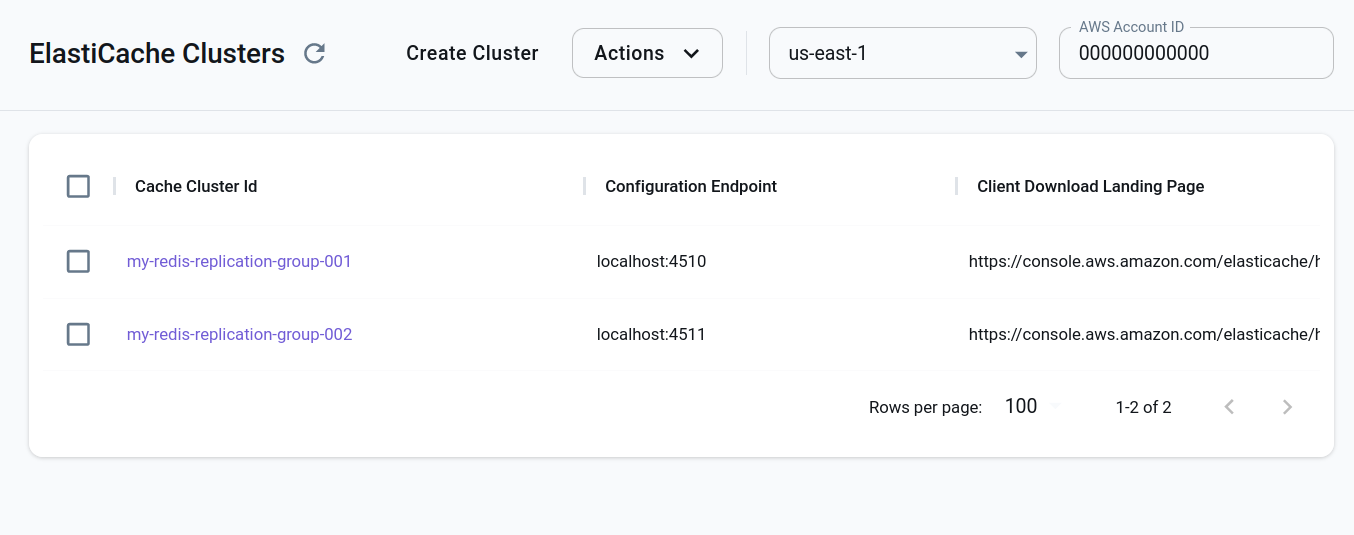
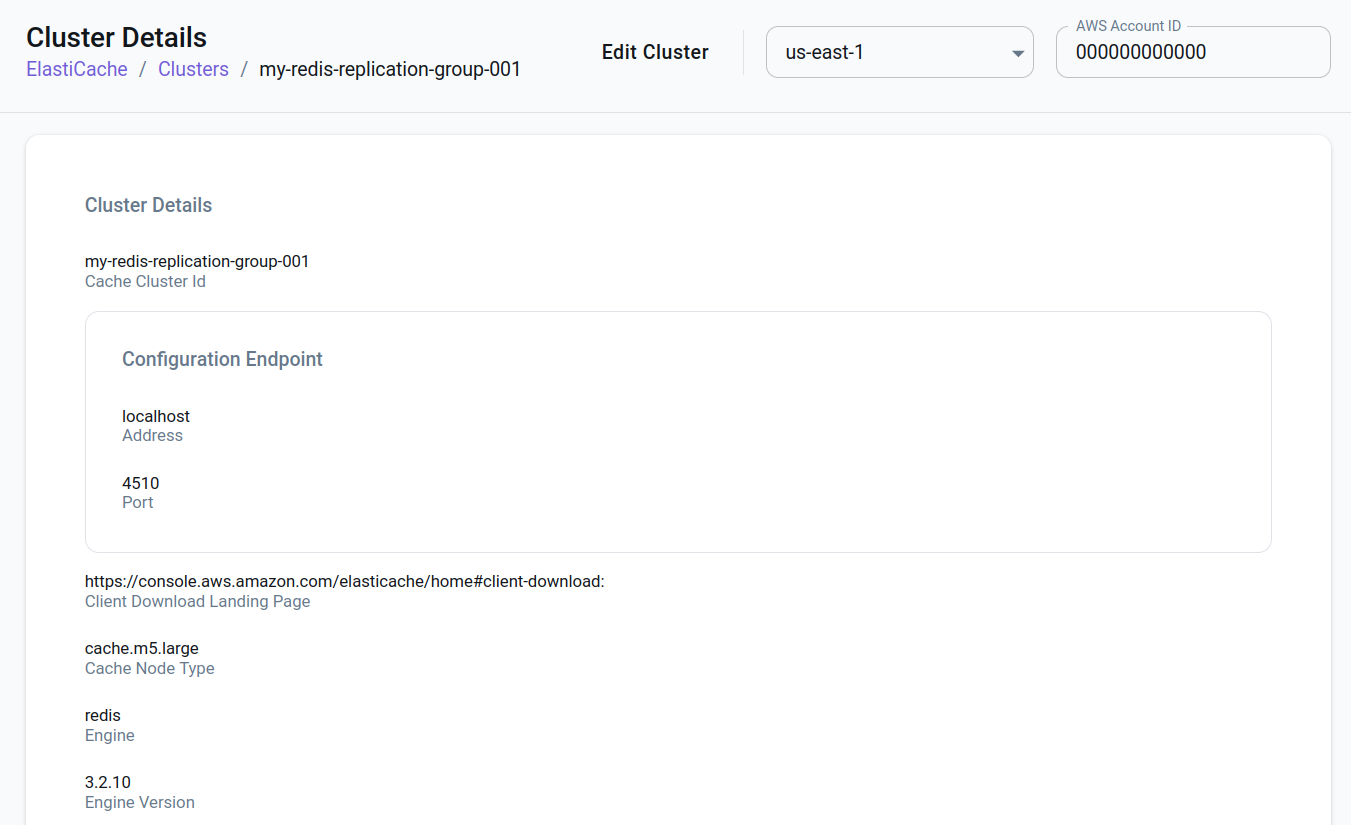
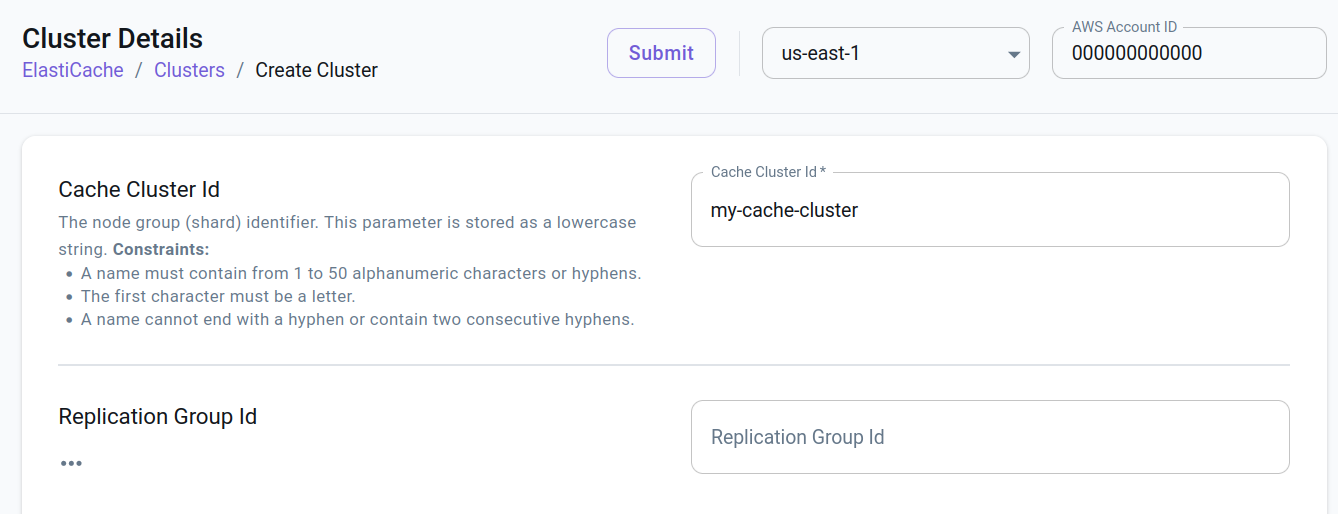
Section titled “Resource browser”The LocalStack Web Application provides a Resource Browser for managing ElastiCache resources. You can access the Resource Browser by opening the LocalStack Web Application in your browser and navigating to the Resources section, then clicking on ElastiCache.
In the ElastiCache resource browser you can:
- List and remove existing cache clusters
- View details of cache clusters
- Create new cache clusters
Current Limitations
Section titled “Current Limitations”LocalStack currently supports Redis single-node and cluster mode, but not memcached. Moreover, LocalStack emulation support for ElastiCache is mostly centered around starting/stopping Redis servers.
Resources necessary to operate a cluster, like parameter groups, security groups, subnets groups, etc. are mocked, but have no effect on the functioning of the Redis servers.
LocalStack currently doesn’t support ElastiCache snapshots, failovers, users/passwords, service updates, replication scaling, SSL, migrations, service integration (like CloudWatch/Kinesis log delivery, SNS notifications) or tests.
API Coverage
Section titled “API Coverage”35 of 75 operations implemented
Available from the Base plan. Licensing details
Find an API
Search the full operation list, then sort the table to compare current support.
Loading operations…
| Verified on Kubernetes | ||
|---|---|---|
| Loading operations… | ||
Complete static API list All 75 operations and their current support status
| Operation | Status |
|---|---|
| AddTagsToResource | Implemented |
| AuthorizeCacheSecurityGroupIngress | Not implemented |
| BatchApplyUpdateAction | Not implemented |
| BatchStopUpdateAction | Not implemented |
| CompleteMigration | Not implemented |
| CopyServerlessCacheSnapshot | Not implemented |
| CopySnapshot | Not implemented |
| CreateCacheCluster | Implemented |
| CreateCacheParameterGroup | Implemented |
| CreateCacheSecurityGroup | Implemented |
| CreateCacheSubnetGroup | Implemented |
| CreateGlobalReplicationGroup | Not implemented |
| CreateReplicationGroup | Implemented |
| CreateServerlessCache | Implemented |
| CreateServerlessCacheSnapshot | Not implemented |
| CreateSnapshot | Not implemented |
| CreateUser | Implemented |
| CreateUserGroup | Implemented |
| DecreaseNodeGroupsInGlobalReplicationGroup | Not implemented |
| DecreaseReplicaCount | Not implemented |
| DeleteCacheCluster | Implemented |
| DeleteCacheParameterGroup | Implemented |
| DeleteCacheSecurityGroup | Implemented |
| DeleteCacheSubnetGroup | Implemented |
| DeleteGlobalReplicationGroup | Not implemented |
| DeleteReplicationGroup | Implemented |
| DeleteServerlessCache | Implemented |
| DeleteServerlessCacheSnapshot | Not implemented |
| DeleteSnapshot | Not implemented |
| DeleteUser | Implemented |
| DeleteUserGroup | Implemented |
| DescribeCacheClusters | Implemented |
| DescribeCacheEngineVersions | Not implemented |
| DescribeCacheParameterGroups | Implemented |
| DescribeCacheParameters | Implemented |
| DescribeCacheSecurityGroups | Implemented |
| DescribeCacheSubnetGroups | Implemented |
| DescribeEngineDefaultParameters | Not implemented |
| DescribeEvents | Not implemented |
| DescribeGlobalReplicationGroups | Not implemented |
| DescribeReplicationGroups | Implemented |
| DescribeReservedCacheNodes | Not implemented |
| DescribeReservedCacheNodesOfferings | Not implemented |
| DescribeServerlessCacheSnapshots | Not implemented |
| DescribeServerlessCaches | Implemented |
| DescribeServiceUpdates | Not implemented |
| DescribeSnapshots | Not implemented |
| DescribeUpdateActions | Not implemented |
| DescribeUserGroups | Implemented |
| DescribeUsers | Implemented |
| DisassociateGlobalReplicationGroup | Not implemented |
| ExportServerlessCacheSnapshot | Not implemented |
| FailoverGlobalReplicationGroup | Not implemented |
| IncreaseNodeGroupsInGlobalReplicationGroup | Not implemented |
| IncreaseReplicaCount | Not implemented |
| ListAllowedNodeTypeModifications | Not implemented |
| ListTagsForResource | Implemented |
| ModifyCacheCluster | Implemented |
| ModifyCacheParameterGroup | Implemented |
| ModifyCacheSubnetGroup | Implemented |
| ModifyGlobalReplicationGroup | Not implemented |
| ModifyReplicationGroup | Implemented |
| ModifyReplicationGroupShardConfiguration | Not implemented |
| ModifyServerlessCache | Implemented |
| ModifyUser | Implemented |
| ModifyUserGroup | Implemented |
| PurchaseReservedCacheNodesOffering | Not implemented |
| RebalanceSlotsInGlobalReplicationGroup | Not implemented |
| RebootCacheCluster | Not implemented |
| RemoveTagsFromResource | Implemented |
| ResetCacheParameterGroup | Not implemented |
| RevokeCacheSecurityGroupIngress | Not implemented |
| StartMigration | Not implemented |
| TestFailover | Not implemented |
| TestMigration | Not implemented |