

Overview
Running integration tests against real Azure in CI means maintaining subscriptions and service principals, waiting on slow provisioning, and sharing test environments with every other pipeline. LocalStack replaces all of that with an emulator that runs inside the CI job itself. Deploy with the same Azure CLI scripts, Bicep templates, or Terraform configurations you already use in production, run your test suite against the emulated Azure APIs, and discard the environment when the job ends. Every run gets a fresh emulator instance, and no test ever needs a real Azure subscription.
CI workflow overview
Section titled “CI workflow overview”The following diagram illustrates a typical CI workflow, using LocalStack instead of the Azure cloud:
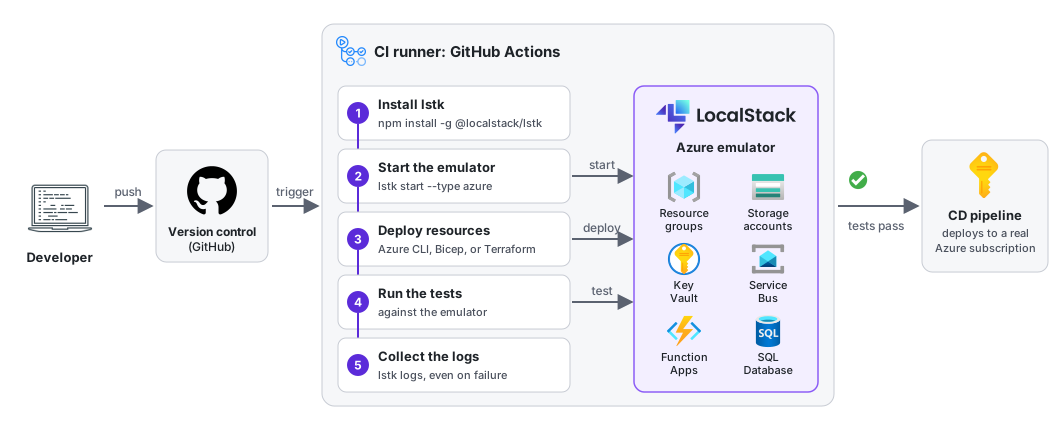
A CI build is triggered when you push source code to your version control repository (such as GitHub). The CI runner checks out the source code, then runs a sequence of build and test steps. Where those tests depend on Azure services, they run against the LocalStack emulator rather than the real Azure cloud. You create the resources they need with the same tools you use with Azure, such as the Azure CLI, Bicep, or Terraform.
If the tests pass, your CD pipeline takes over and deploys the application to real Azure infrastructure. A deployment therefore only ever starts from a build that has already been validated against emulated Azure, which increases your confidence in the code you ship.
CI integrations
Section titled “CI integrations”The steps required to run LocalStack in CI are largely the same, no matter which CI provider you use:
- Expose a CI Auth Token
- Install the
lstkCLI and related tools - Start the emulator
- Deploy the resources you need
- Run your tests
- Collect the output logs
Start with the CI Best Practices page for the commands behind each step. GitHub Actions is the CI provider tested with the Azure emulator so far, and its page shows a complete workflow.