

Redshift
Introduction
Section titled “Introduction”RedShift is a cloud-based data warehouse solution which allows end users to aggregate huge volumes of data and parallel processing of data. RedShift is fully managed by AWS and serves as a petabyte-scale service which allows users to create visualization reports and critically analyze collected data. The query results can be saved to an S3 Data Lake while additional analytics can be provided by Athena or SageMaker.
LocalStack allows you to use the RedShift APIs in your local environment to analyze structured and semi-structured data across local data warehouses and data lakes. The supported APIs are available on the API coverage section for Redshift and Redshift Data, which provides information on the extent of RedShift’s integration with LocalStack.
Getting started
Section titled “Getting started”This guide is designed for users new to RedShift and assumes basic knowledge of the AWS CLI and our lstk aws command.
Start your LocalStack container using your preferred method. We will demonstrate how to create a RedShift cluster and database while using a Glue Crawler to populate the metadata store with the schema of the RedShift database tables using the AWS CLI.
Define the variables
Section titled “Define the variables”First, we will define the variables we will use throughout this guide. Export the following variables in your shell:
REDSHIFT_CLUSTER_IDENTIFIER="redshiftcluster"REDSHIFT_SCHEMA_NAME="public"REDSHIFT_DATABASE_NAME="db1"REDSHIFT_TABLE_NAME="sales"REDSHIFT_USERNAME="crawlertestredshiftusername"REDSHIFT_PASSWORD="crawlertestredshiftpassword"GLUE_DATABASE_NAME="gluedb"GLUE_CONNECTION_NAME="glueconnection"GLUE_CRAWLER_NAME="gluecrawler"The above variables will be used to create a RedShift cluster, database, table, and user. You will also create a Glue database, connection, and crawler to populate the Glue Data Catalog with the schema of the RedShift database tables.
Create a RedShift cluster and database
Section titled “Create a RedShift cluster and database”You can create a RedShift cluster using the CreateCluster API.
The following command will create a RedShift cluster with the variables defined above:
lstk aws redshift create-cluster \ --cluster-identifier $REDSHIFT_CLUSTER_IDENTIFIER \ --db-name $REDSHIFT_DATABASE_NAME \ --master-username $REDSHIFT_USERNAME \ --master-user-password $REDSHIFT_PASSWORD \ --node-type n1You can fetch the status of the cluster using the DescribeClusters API.
Run the following command to extract the URL of the cluster:
REDSHIFT_URL=$(lstk aws redshift describe-clusters \ --cluster-identifier $REDSHIFT_CLUSTER_IDENTIFIER | jq -r '(.Clusters[0].Endpoint.Address) + ":" + (.Clusters[0].Endpoint.Port|tostring)')Create a Glue database, connection, and crawler
Section titled “Create a Glue database, connection, and crawler”You can create a Glue database using the CreateDatabase API.
The following command will create a Glue database:
lstk aws glue create-database \ --database-input "{\"Name\": \"$GLUE_DATABASE_NAME\"}"You can create a connection to the RedShift cluster using the CreateConnection API.
The following command will create a Glue connection with the RedShift cluster:
lstk aws glue create-connection \ --connection-input "{\"Name\":\"$GLUE_CONNECTION_NAME\", \"ConnectionType\": \"JDBC\", \"ConnectionProperties\": {\"USERNAME\": \"$REDSHIFT_USERNAME\", \"PASSWORD\": \"$REDSHIFT_PASSWORD\", \"JDBC_CONNECTION_URL\": \"jdbc:redshift://$REDSHIFT_URL/$REDSHIFT_DATABASE_NAME\"}}"Finally, you can create a Glue crawler using the CreateCrawler API.
The following command will create a Glue crawler:
lstk aws glue create-crawler \ --name $GLUE_CRAWLER_NAME \ --database-name $GLUE_DATABASE_NAME \ --targets "{\"JdbcTargets\": [{\"ConnectionName\": \"$GLUE_CONNECTION_NAME\", \"Path\": \"$REDSHIFT_DATABASE_NAME/%/$REDSHIFT_TABLE_NAME\"}]}" \ --role r1Create table in RedShift
Section titled “Create table in RedShift”You can create a table in RedShift using the CreateTable API.
The following command will create a table in RedShift:
REDSHIFT_STATEMENT_ID=$(lstk aws redshift-data execute-statement \ --cluster-identifier $REDSHIFT_CLUSTER_IDENTIFIER \ --database $REDSHIFT_DATABASE_NAME \ --sql \ "create table $REDSHIFT_TABLE_NAME(salesid integer not null, listid integer not null, sellerid integer not null, buyerid integer not null, eventid integer not null, dateid smallint not null, qtysold smallint not null, pricepaid decimal(8,2), commission decimal(8,2), saletime timestamp)" | jq -r .Id)You can check the status of the statement using the DescribeStatement API.
The following command will check the status of the statement:
wait "lstk aws redshift-data describe-statement \ --id $REDSHIFT_STATEMENT_ID" ".Status" "FINISHED"Run the crawler
Section titled “Run the crawler”You can run the crawler using the StartCrawler API.
The following command will run the crawler:
lstk aws glue start-crawler \ --name $GLUE_CRAWLER_NAMEYou can wait for the crawler to finish using the GetCrawler API.
The following command will wait for the crawler to finish:
wait "lstk aws glue get-crawler \ --name $GLUE_CRAWLER_NAME" ".Crawler.State" "READY"You can finally retrieve the schema of the table using the GetTable API.
The following command will retrieve the schema of the table:
lstk aws glue get-table \ --database-name $GLUE_DATABASE_NAME \ --name "${REDSHIFT_DATABASE_NAME}_${REDSHIFT_SCHEMA_NAME}_${REDSHIFT_TABLE_NAME}"Resource Browser
Section titled “Resource Browser”The LocalStack Web Application provides a Resource Browser for managing RedShift clusters. You can access the Resource Browser by opening the LocalStack Web Application in your browser, navigating to the Resources section, and then clicking on RedShift under the Analytics section.
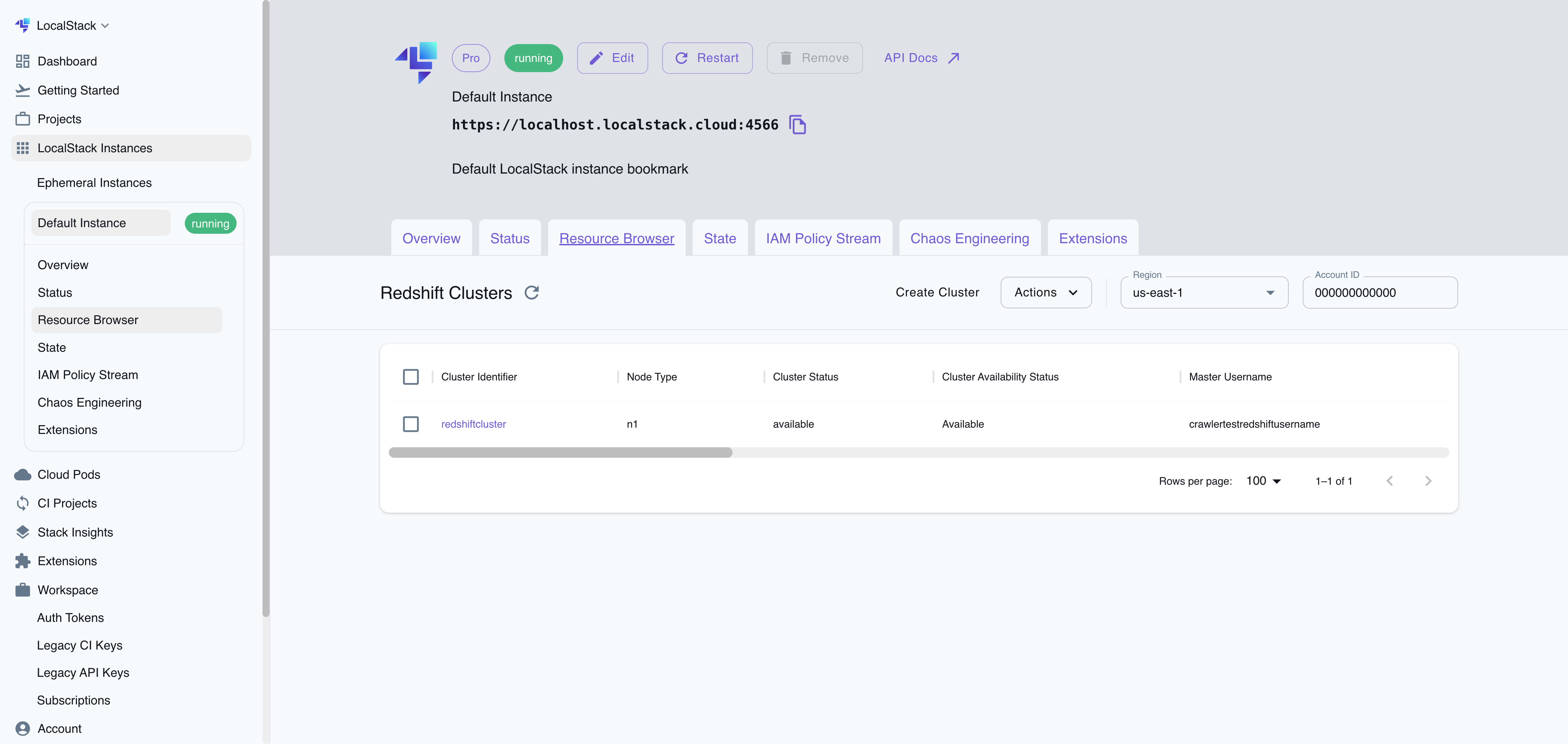
The Resource Browser allows you to perform the following actions:
- Create Cluster: Create a new RedShift cluster by specifying the cluster identifier, database name, master username, master password, and node type.
- View Cluster: View the details of a RedShift cluster, including the cluster identifier, database name, master username, master password, node type, and endpoint.
- Edit Cluster: Edit an existing RedShift cluster by clicking the cluster name and clicking the EDIT CLUSTER button.
- Remove Cluster: Remove an existing Redshift cluster by selecting it from the table and clicking the ACTIONS followed by Remove Selected button.
API Coverage
Section titled “API Coverage”39 of 145 operations implemented
Available from Hobby; some service variants start at Ultimate. Licensing details
Find an API
Search the full operation list, then sort the table to compare current support.
Loading operations…
| Verified on Kubernetes | ||
|---|---|---|
| Loading operations… | ||
Complete static API list All 145 operations and their current support status
| Operation | Status |
|---|---|
| AcceptReservedNodeExchange | Not implemented |
| AddPartner | Not implemented |
| AssociateDataShareConsumer | Not implemented |
| AuthorizeClusterSecurityGroupIngress | Implemented |
| AuthorizeDataShare | Not implemented |
| AuthorizeEndpointAccess | Not implemented |
| AuthorizeSnapshotAccess | Not implemented |
| BatchDeleteClusterSnapshots | Not implemented |
| BatchModifyClusterSnapshots | Not implemented |
| CancelResize | Not implemented |
| CopyClusterSnapshot | Not implemented |
| CreateAuthenticationProfile | Not implemented |
| CreateCluster | Implemented |
| CreateClusterParameterGroup | Implemented |
| CreateClusterSecurityGroup | Implemented |
| CreateClusterSnapshot | Implemented |
| CreateClusterSubnetGroup | Implemented |
| CreateCustomDomainAssociation | Not implemented |
| CreateEndpointAccess | Not implemented |
| CreateEventSubscription | Not implemented |
| CreateHsmClientCertificate | Not implemented |
| CreateHsmConfiguration | Not implemented |
| CreateIntegration | Not implemented |
| CreateQev2IdcApplication | Not implemented |
| CreateRedshiftIdcApplication | Not implemented |
| CreateScheduledAction | Not implemented |
| CreateSnapshotCopyGrant | Implemented |
| CreateSnapshotSchedule | Not implemented |
| CreateTags | Implemented |
| CreateUsageLimit | Not implemented |
| DeauthorizeDataShare | Not implemented |
| DeleteAuthenticationProfile | Not implemented |
| DeleteCluster | Implemented |
| DeleteClusterParameterGroup | Implemented |
| DeleteClusterSecurityGroup | Implemented |
| DeleteClusterSnapshot | Implemented |
| DeleteClusterSubnetGroup | Implemented |
| DeleteCustomDomainAssociation | Not implemented |
| DeleteEndpointAccess | Not implemented |
| DeleteEventSubscription | Not implemented |
| DeleteHsmClientCertificate | Not implemented |
| DeleteHsmConfiguration | Not implemented |
| DeleteIntegration | Not implemented |
| DeletePartner | Not implemented |
| DeleteQev2IdcApplication | Not implemented |
| DeleteRedshiftIdcApplication | Not implemented |
| DeleteResourcePolicy | Not implemented |
| DeleteScheduledAction | Not implemented |
| DeleteSnapshotCopyGrant | Implemented |
| DeleteSnapshotSchedule | Not implemented |
| DeleteTags | Implemented |
| DeleteUsageLimit | Not implemented |
| DeregisterNamespace | Not implemented |
| DescribeAccountAttributes | Not implemented |
| DescribeAuthenticationProfiles | Not implemented |
| DescribeClusterDbRevisions | Not implemented |
| DescribeClusterParameterGroups | Implemented |
| DescribeClusterParameters | Implemented |
| DescribeClusterSecurityGroups | Implemented |
| DescribeClusterSnapshots | Implemented |
| DescribeClusterSubnetGroups | Implemented |
| DescribeClusterTracks | Not implemented |
| DescribeClusterVersions | Not implemented |
| DescribeClusters | Implemented |
| DescribeCustomDomainAssociations | Not implemented |
| DescribeDataShares | Not implemented |
| DescribeDataSharesForConsumer | Not implemented |
| DescribeDataSharesForProducer | Not implemented |
| DescribeDefaultClusterParameters | Implemented |
| DescribeEndpointAccess | Not implemented |
| DescribeEndpointAuthorization | Not implemented |
| DescribeEventCategories | Not implemented |
| DescribeEventSubscriptions | Not implemented |
| DescribeEvents | Not implemented |
| DescribeHsmClientCertificates | Not implemented |
| DescribeHsmConfigurations | Not implemented |
| DescribeInboundIntegrations | Not implemented |
| DescribeIntegrations | Not implemented |
| DescribeLoggingStatus | Implemented |
| DescribeNodeConfigurationOptions | Not implemented |
| DescribeOrderableClusterOptions | Not implemented |
| DescribePartners | Not implemented |
| DescribeQev2IdcApplications | Not implemented |
| DescribeRedshiftIdcApplications | Not implemented |
| DescribeReservedNodeExchangeStatus | Not implemented |
| DescribeReservedNodeOfferings | Not implemented |
| DescribeReservedNodes | Not implemented |
| DescribeResize | Not implemented |
| DescribeScheduledActions | Not implemented |
| DescribeSnapshotCopyGrants | Implemented |
| DescribeSnapshotSchedules | Not implemented |
| DescribeStorage | Not implemented |
| DescribeTableRestoreStatus | Not implemented |
| DescribeTags | Implemented |
| DescribeUsageLimits | Not implemented |
| DisableLogging | Implemented |
| DisableSnapshotCopy | Implemented |
| DisassociateDataShareConsumer | Not implemented |
| EnableLogging | Implemented |
| EnableSnapshotCopy | Implemented |
| FailoverPrimaryCompute | Not implemented |
| GetClusterCredentials | Implemented |
| GetClusterCredentialsWithIAM | Not implemented |
| GetIdentityCenterAuthToken | Not implemented |
| GetReservedNodeExchangeConfigurationOptions | Not implemented |
| GetReservedNodeExchangeOfferings | Not implemented |
| GetResourcePolicy | Not implemented |
| ListRecommendations | Not implemented |
| ModifyAquaConfiguration | Not implemented |
| ModifyAuthenticationProfile | Not implemented |
| ModifyCluster | Implemented |
| ModifyClusterDbRevision | Not implemented |
| ModifyClusterIamRoles | Implemented |
| ModifyClusterMaintenance | Not implemented |
| ModifyClusterParameterGroup | Implemented |
| ModifyClusterSnapshot | Not implemented |
| ModifyClusterSnapshotSchedule | Not implemented |
| ModifyClusterSubnetGroup | Implemented |
| ModifyCustomDomainAssociation | Not implemented |
| ModifyEndpointAccess | Not implemented |
| ModifyEventSubscription | Not implemented |
| ModifyIntegration | Not implemented |
| ModifyLakehouseConfiguration | Not implemented |
| ModifyQev2IdcApplication | Not implemented |
| ModifyRedshiftIdcApplication | Not implemented |
| ModifyScheduledAction | Not implemented |
| ModifySnapshotCopyRetentionPeriod | Implemented |
| ModifySnapshotSchedule | Not implemented |
| ModifyUsageLimit | Not implemented |
| PauseCluster | Implemented |
| PurchaseReservedNodeOffering | Not implemented |
| PutResourcePolicy | Not implemented |
| RebootCluster | Implemented |
| RegisterNamespace | Not implemented |
| RejectDataShare | Not implemented |
| ResetClusterParameterGroup | Not implemented |
| ResizeCluster | Not implemented |
| RestoreFromClusterSnapshot | Implemented |
| RestoreTableFromClusterSnapshot | Not implemented |
| ResumeCluster | Implemented |
| RevokeClusterSecurityGroupIngress | Not implemented |
| RevokeEndpointAccess | Not implemented |
| RevokeSnapshotAccess | Not implemented |
| RotateEncryptionKey | Not implemented |
| UpdatePartnerStatus | Not implemented |
API Coverage (Redshift Data)
Section titled “API Coverage (Redshift Data)”6 of 12 operations implemented
Available from Hobby; some service variants start at Ultimate. Licensing details
Find an API
Search the full operation list, then sort the table to compare current support.
Loading operations…
| Verified on Kubernetes | ||
|---|---|---|
| Loading operations… | ||
Complete static API list All 12 operations and their current support status
| Operation | Status |
|---|---|
| BatchExecuteStatement | Not implemented |
| CancelStatement | Not implemented |
| DescribeStatement | Implemented |
| DescribeTable | Implemented |
| ExecuteStatement | Implemented |
| GetStatementResult | Implemented |
| GetStatementResultV2 | Not implemented |
| ListDatabases | Implemented |
| ListSchemas | Not implemented |
| ListSessions | Not implemented |
| ListStatements | Not implemented |
| ListTables | Implemented |