

App Emulators
Introduction
Section titled “Introduction”App emulators are local simulations of third-party SaaS APIs such as Stripe and Slack. They run inside the LocalStack Pro container, so your application can call them the way it calls the real service, without a vendor account.
App emulators are available to all LocalStack customers.
In this quickstart you start LocalStack, then make the same API calls your app would make to Stripe: create a customer, create a payment intent for that customer and read it back. The Stripe app emulator answers them locally.
How it works
Section titled “How it works”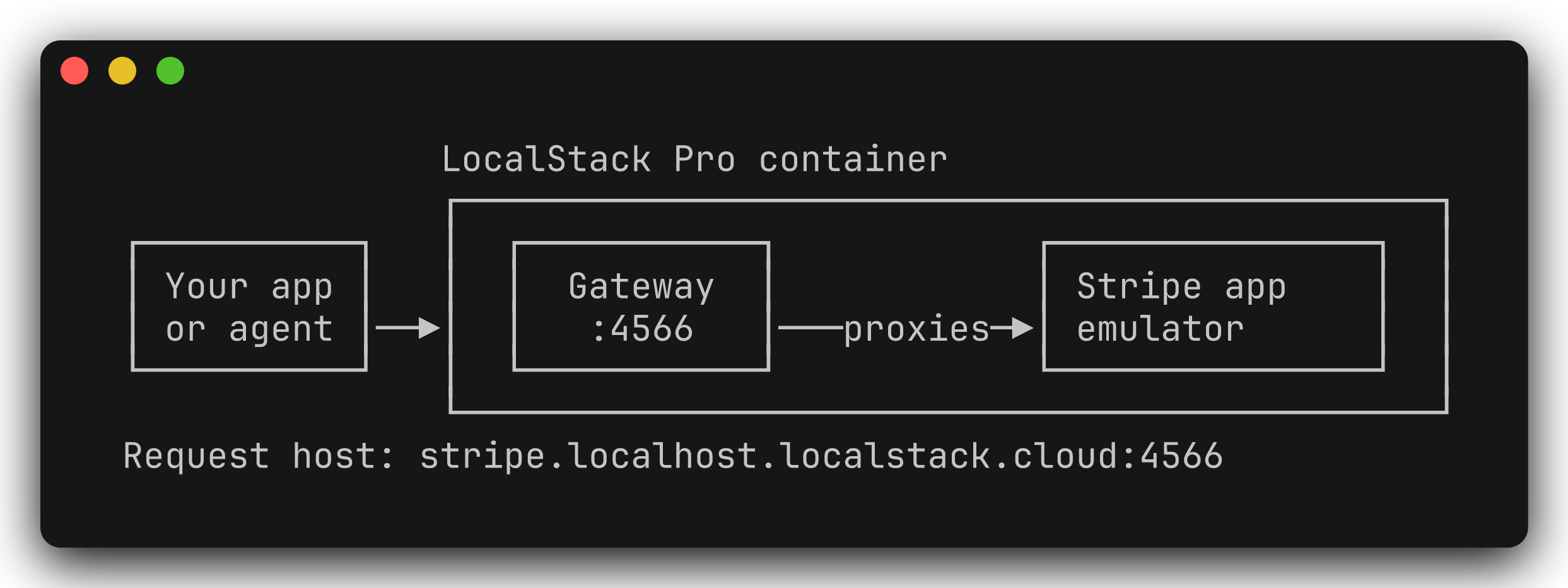
- The first request to an app emulator’s hostname downloads its Linux binary from a GitHub release into the container.
- LocalStack starts the binary on a local port and waits up to 30 seconds for its health check to pass.
- The gateway proxies that request, and every later one, to the running process.
If you never call an app emulator, nothing is downloaded. Each release is built in CI, scanned for known vulnerabilities, published with a software bill of materials, and verified before it is tagged.
Available app emulators
Section titled “Available app emulators”- stripe:
stripe.localhost.localstack.cloud - resend:
resend.localhost.localstack.cloud - logo.dev:
logodev.localhost.localstack.cloud - slack:
slack.localhost.localstack.cloud - plaid:
plaid.localhost.localstack.cloud - xero:
xero.localhost.localstack.cloud
Upcoming app emulators
Section titled “Upcoming app emulators”In-progress being rebuilt to our customer-ready standards:
- twilio:
twilio.localhost.localstack.cloud - posthog:
posthog.localhost.localstack.cloud
Prerequisites
Section titled “Prerequisites”- Docker and
lstk. See Installation. - A LocalStack auth token. Run
lstk login, or setLOCALSTACK_AUTH_TOKEN. See Auth Token. - Network access from the container to GitHub the first time you call each app emulator.
curl, or any HTTP client.
Step by Step
Section titled “Step by Step”Step 1: Start LocalStack
Section titled “Step 1: Start LocalStack”Run lstk start. On the first run, lstk opens a browser to log you in. At startup the container maps a hostname for each app emulator.
lstk startPulling localstack/localstack-pro:latest...Preparing LocalStack...✓ Pulled localstack/localstack-pro:latestChecking license...✓ Valid license (Enterprise)Starting LocalStack...✓ LocalStack is running (containerId: 6e287e57c450)• Endpoint: localhost.localstack.cloud:4566• Web app: https://app.localstack.cloud> Tip: View emulator logs: lstk logs --followApp emulators share your LocalStack address. Put the app emulator’s name in front of your LocalStack host. With the default setup, Stripe is at stripe.localhost.localstack.cloud:4566.
Step 2: Create a customer
Section titled “Step 2: Create a customer”Create a customer with the Stripe API, using a test API key such as sk_test_x.
curl -u sk_test_x: -d "email=jenny@example.com" -d "name=Jenny Rosen" http://stripe.localhost.localstack.cloud:4566/v1/customers{ "id": "cus_000001", "object": "customer", "name": "Jenny Rosen", "email": "jenny@example.com", "balance": 0, "delinquent": false, "livemode": false, "created": 1794900564}The response includes the customer id, which starts with cus_. The first call also installs the Stripe app emulator. In testing, a first call took between 2 and 20 seconds because it downloaded the binary, and later calls were immediate. lstk keeps downloaded app emulators in its volume, so they are not downloaded again after a restart.
Step 3: Create a payment intent
Section titled “Step 3: Create a payment intent”Create a payment intent for that customer, passing the customer id from Step 2.
curl -u sk_test_x: -d amount=2000 -d currency=usd -d customer=cus_000001 http://stripe.localhost.localstack.cloud:4566/v1/payment_intents{ "id": "pi_000001", "object": "payment_intent", "amount": 2000, "amount_received": 0, "currency": "usd", "customer": "cus_000001", "status": "requires_payment_method", "capture_method": "automatic", "confirmation_method": "automatic", "client_secret": "pi_000001_secret_b14b843edf61a58870d3f96f", "livemode": false, "created": 1794900570}Step 4: Read the payment intent back
Section titled “Step 4: Read the payment intent back”Retrieve the payment intent with the id from Step 3.
curl -u sk_test_x: http://stripe.localhost.localstack.cloud:4566/v1/payment_intents/pi_000001{ "id": "pi_000001", "object": "payment_intent", "amount": 2000, "amount_received": 0, "currency": "usd", "customer": "cus_000001", "status": "requires_payment_method", "capture_method": "automatic", "confirmation_method": "automatic", "client_secret": "pi_000001_secret_b14b843edf61a58870d3f96f", "livemode": false, "created": 1794900570}Use app emulators with AI coding agents
Section titled “Use app emulators with AI coding agents”When an AI coding agent cannot reach a third-party API, it usually writes a mock and tests against that, so your code is only checked against the agent’s own guess of the API. With app emulators, the agent calls the same local endpoints you called in this quickstart, and its code runs against an API that answers like the vendor’s.
Your agent needs nothing extra. App emulators are plain HTTP endpoints on your LocalStack host, so any agent that can run curl, a script, or your tests can use them. You do not need an MCP server, a plugin, or a vendor account.
Tell your agent to use app emulators
Section titled “Tell your agent to use app emulators”Add an AGENTS.md file to the root of your repository. Many AI coding agents read this file before they start work. Tell the agent which app emulators to use instead of mocks:
## Application emulators
This repo tests third-party APIs against LocalStack app emulators.Start LocalStack with `lstk start` before running code or tests.Do not mock Stripe. Use the Stripe app emulator athttp://stripe.localhost.localstack.cloud:4566 with the test API key sk_test_x.
If your code uses a vendor SDK, tell the agent to point the SDK at the app emulator’s URL. For example, the Stripe Python and Node.js SDKs both let you override the API host.
The LocalStack for SaaS Applications repository uses this pattern. Its AGENTS.md tells agents to use the app emulators listed in emulators.lock before mocking any of those dependencies.
Try it with a prompt
Section titled “Try it with a prompt”With LocalStack running, give your agent a prompt like this:
LocalStack is running with the Stripe app emulator at http://stripe.localhost.localstack.cloud:4566.Write a script that creates a Stripe customer and a 20 USD payment intent for that customer, using the test API key sk_test_x.Run the script against the app emulator, and fix any errors.Review agent-generated code before you use it with the real vendor API. For more ways to use LocalStack with AI coding agents, see AI & Agent Workflows.
Troubleshooting
Section titled “Troubleshooting”LocalStack exits with “activation failed”
Section titled “LocalStack exits with “activation failed””The container needs an auth token. Run lstk login, or set LOCALSTACK_AUTH_TOKEN, then start LocalStack again.
The first call to an app emulator is slow
Section titled “The first call to an app emulator is slow”The first call downloads the app emulator, which can take up to about 20 seconds. Later calls do not.
A call returns resource_missing
Section titled “A call returns resource_missing”A fresh Stripe app emulator has no data. Create the customer in Step 2 first, and pass the ids it returns.
A call returns 503 “Application not available”
Section titled “A call returns 503 “Application not available””The response names the app emulator, for example Application stripe not available. The app emulator could not be downloaded or did not start. Check that the container can reach GitHub. LocalStack does not retry within the same run, so restart LocalStack after you fix the network.
Next steps
Section titled “Next steps”- Explore the demos and sample apps in the LocalStack for SaaS Applications repository.
- Set up your AI coding agent with LocalStack in AI & Agent Workflows.