

API Gateway
Introduction
Section titled “Introduction”API Gateway is a managed service that enables developers to create, deploy, and manage APIs (Application Programming Interfaces).
It allows easy creation of REST, HTTP, and WebSocket APIs to securely access data, business logic, or functionality from backend services like AWS Lambda functions or EC2 instances.
API Gateway supports standard HTTP methods such as GET, POST, PUT, PATCH, and DELETE and integrates with various AWS services, including Lambda, Cognito, CloudWatch, and X-Ray.
LocalStack supports API Gateway V2 (HTTP, Management and WebSocket API) in the Base plan. LocalStack allows you to use the API Gateway APIs to create, deploy, and manage APIs on your local machine to invoke those exposed API endpoints.
The supported APIs are available on the API coverage section for API Gateway V1, API Gateway V2, and API Gateway Management, which provides information on the extent of API Gateway’s integration with LocalStack.
Getting started
Section titled “Getting started”This guide is designed for users new to API Gateway and assumes basic knowledge of the AWS CLI and our lstk aws command.
Start your LocalStack container using your preferred method.
We will use the Lambda proxy integration to integrate an API method with a Lambda function.
The Lambda function will be invoked with a GET request and return a response with a status code of 200 and a body containing the string Hello from Lambda!.
Create a Lambda function
Section titled “Create a Lambda function”Create a new file named lambda.js with the following contents:
'use strict'
const apiHandler = (payload, context, callback) => {    callback(null, {        statusCode: 200,        body: JSON.stringify({            message: 'Hello from Lambda'        }),    });}
module.exports = {    apiHandler,}
The above code defines a function named apiHandler that returns a response with a status code of 200 and a body containing the string Hello from Lambda.
Zip the file and upload it to LocalStack using the lstk aws command.
Run the following command:
zip function.zip lambda.jslstk aws lambda create-function \ --function-name apigw-lambda \ --runtime nodejs16.x \ --handler lambda.apiHandler \ --memory-size 128 \ --zip-file fileb://function.zip \ --role arn:aws:iam::111111111111:role/apigwThis creates a new Lambda function named apigw-lambda with the code you specified.
Create a REST API
Section titled “Create a REST API”We will use the API Gateway’s CreateRestApi API to create a new REST API.
Here’s an example command:
lstk aws apigateway create-rest-api --name 'API Gateway Lambda integration'This creates a new REST API named API Gateway Lambda integration.
{ "id": "cor3o5oeci", "name": "API Gateway Lambda integration", "createdDate": "2023-04-27T16:08:46+05:30", "apiKeySource": "HEADER", "endpointConfiguration": { "types": [ "EDGE" ] }, "disableExecuteApiEndpoint": false}Note the REST API ID returned in the response. You’ll need this ID for the next step.
Fetch the Resources
Section titled “Fetch the Resources”Use the REST API ID generated in the previous step to fetch the resources for the API, using the GetResources API:
lstk aws apigateway get-resources --rest-api-id <REST_API_ID>{ "items": [ { "id": "u53af9hm83", "path": "/" } ]}Note the ID of the root resource returned in the response. You’ll need this ID for the next step.
Create a resource
Section titled “Create a resource”Create a new resource for the API using the CreateResource API.
Use the ID of the resource returned in the previous step as the parent ID:
lstk aws apigateway create-resource \ --rest-api-id <REST_API_ID> \ --parent-id <PARENT_ID> \ --path-part "{somethingId}"{ "id": "zzcvcf56ar", "parentId": "u53af9hm83", "pathPart": "{somethingId}", "path": "/{somethingId}"}Note the ID of the root resource returned in the response. You’ll need this Resource ID for the next step.
Add a method and integration
Section titled “Add a method and integration”Add a GET method to the resource using the PutMethod API.
Use the ID of the resource returned in the previous step as the Resource ID:
lstk aws apigateway put-method \ --rest-api-id <REST_API_ID> \ --resource-id <RESOURCE_ID> \ --http-method GET \ --request-parameters "method.request.path.somethingId=true" \ --authorization-type "NONE"{ "httpMethod": "GET", "authorizationType": "NONE", "apiKeyRequired": false, "requestParameters": { "method.request.path.somethingId": true }}Now, create a new integration for the method using the PutIntegration API.
lstk aws apigateway put-integration \ --rest-api-id <REST_API_ID> \ --resource-id <RESOURCE_ID> \ --http-method GET \ --type AWS_PROXY \ --integration-http-method POST \ --uri arn:aws:apigateway:us-east-1:lambda:path/2015-03-31/functions/arn:aws:lambda:us-east-1:000000000000:function:apigw-lambda/invocations \ --passthrough-behavior WHEN_NO_MATCHThe above command integrates the GET method with the Lambda function created in the first step.
We can now proceed with the deployment before invoking the API.
Create a deployment
Section titled “Create a deployment”Create a new deployment for the API using the CreateDeployment API:
lstk aws apigateway create-deployment \ --rest-api-id <REST_API_ID> \ --stage-name devYour API is now ready to be invoked. You can use curl or any HTTP REST client to invoke the API endpoint:
curl -X GET http://<REST_API_ID>.execute-api.localhost.localstack.cloud:4566/dev/test{"message":"Hello World"}You can also use our alternative URL format in case of DNS issues:
curl -X GET http://localhost:4566/_aws/execute-api/<REST_API_ID>/dev/test{"message":"Hello World"}Deployments and stages
Section titled “Deployments and stages”LocalStack follows the AWS deployment model for REST and HTTP APIs: create a deployment to make your API reachable.
You can create several stages, such as dev and production, that point to different deployments of your API, each with its own settings and stage variables.
For HTTP APIs, LocalStack also supports automatic deployments of your stages.
LocalStack features
Section titled “LocalStack features”LocalStack provides additional features and functionality on top of the official AWS APIs, to help you develop, debug, and test your local API Gateway APIs.
Accessing HTTP APIs via Local Domain Name
Section titled “Accessing HTTP APIs via Local Domain Name”To demonstrate how to access APIs through LocalStack’s local domain name, consider the following Serverless configuration that shows two Lambda functions (serviceV1 and serviceV2) that are connected to an API Gateway v1 (http event) and an API Gateway v2 endpoint (httpApi event), respectively:
...plugins: - serverless-localstackcustom: localstack: stages: [local]functions: serviceV1: handler: handler.handler events: - http: # for API GW v1 integration method: POST path: /my/path1 serviceV2: handler: handler.handler events: - httpApi: # for API GW v2 integration method: POST path: /my/path2After you deploy the Lambda functions and API Gateway endpoints, you can access them using the LocalStack edge port (4566 by default).
There are two alternative URL formats to access these endpoints.
Recommended URL format
Section titled “Recommended URL format”The recommended URL format for accessing APIs is to use the following URL syntax with an execute-api hostname:
http://<apiId>.execute-api.localhost.localstack.cloud:4566/<stageName>/<path>Here’s an example of how you would access the HTTP/REST API with an ID of 0v1p6q6:
http://0v1p6q6.execute-api.localhost.localstack.cloud:4566/local/my/path2Note that the local stage ID is added in this example.
Adding the stage ID is required for API Gateway V1 APIs, but optional for API Gateway V2 APIs (in case a $default stage is created).
For v2 APIs, the following URL should also work:
http://0v1p6q6.execute-api.localhost.localstack.cloud:4566/my/path1Alternative URL format
Section titled “Alternative URL format”The alternative URL format is an endpoint with the predefined base path /_aws/execute-api:
http://localhost:4566/_aws/execute-api/<apiId>/<stageName>/<path>For the example above, the URL would be:
http://localhost:4566/_aws/execute-api/0v1p6q6/local/my/path1This format is sometimes used in case of local DNS issues.
WebSocket APIs Pro
Section titled “WebSocket APIs ”WebSocket APIs provide real-time communication channels between a client and a server. To use WebSockets in LocalStack, you can define a WebSocket route in your Serverless configuration:
...plugins: - serverless-localstackcustom: localstack: stages: [local]functions: actionHandler: handler: handler.handler events: - websocket: route: test-actionUpon deployment of the Serverless project (for example with sls deploy --stage local), LocalStack creates a new API Gateway V2 endpoint.
To retrieve the list of APIs and verify the WebSocket endpoint, you can use the lstk aws CLI:
lstk aws apigatewayv2 get-apis{ "Items": [{ "ApiEndpoint": "ws://129ca37e.execute-api.localhost.localstack.cloud:4566", "ApiId": "129ca37e", ... }]}As on AWS, you connect to a WebSocket API at <ApiEndpoint>/<stageName>.
In the above example, the WebSocket URL of the local stage is ws://129ca37e.execute-api.localhost.localstack.cloud:4566/local.
You can also use the alternative URL format on the gateway port: ws://localhost.localstack.cloud:4566/_aws/execute-api/129ca37e/local.
Assuming your Serverless project contains a simple Lambda handler.js like this:
module.exports.handler = function(event, context, callback) { callback(null, event);};When you send a message to the WebSocket at ws://129ca37e.execute-api.localhost.localstack.cloud:4566/local, LocalStack returns the same message as a response on the same WebSocket.
To push data from a backend service to the WebSocket connection, you can use the Amazon API Gateway Management API.
In LocalStack, use the following CLI command (replace <connectionId> with your WebSocket connection ID):
lstk aws apigatewaymanagementapi \ post-to-connection \ --connection-id '<connectionId>' \ --data '{"msg": "Hi"}'Custom IDs for API Gateway resources via tags
Section titled “Custom IDs for API Gateway resources via tags”You can assign custom IDs to API Gateway REST and HTTP APIs using the _custom_id_ tag during resource creation.
This can be useful to ensure a static endpoint URL for your API, simplifying testing and integration with other services.
To assign a custom ID to an API Gateway REST API, use the create-rest-api command with the tags={"_custom_id_":"myid123"} parameter.
The following example assigns the custom ID "myid123" to the API:
lstk aws apigateway create-rest-api --name my-api --tags '{"_custom_id_":"myid123"}'{ "id": "myid123", ....}You can also configure the protocol type, the possible values being HTTP and WEBSOCKET:
lstk aws apigatewayv2 create-api \ --name=my-api \ --protocol-type=HTTP --tags="_custom_id_=my-api"{ "ApiEndpoint": "my-api.execute-api.localhost.localstack.cloud:4566", "ApiId": "my-api", "Name": "my-api", "ProtocolType": "HTTP", "Tags": { "_custom_id_": "my-api" }}Custom Domain Names with API Gateway Pro
Section titled “Custom Domain Names with API Gateway ”You can use custom domain names with API Gateway REST APIs, HTTP APIs, and WebSocket APIs.
To use custom domains, you will need to set up an API Gateway Domain Name and create an API Mapping linked to your API.
Assuming your custom domain is set up as test.example.com to point to your REST API with a base path mapping base-path linked to your stage named dev, the following command will be directed to your REST API on the dev stage.
You should include the Host header with the custom domain name in your request, so you don’t need to set up any custom DNS to resolve to LocalStack.
curl -H 'Host: test.example.com' http://localhost:4566/base-pathThe request above will be equivalent to the following request:
curl http://<your-api-id>.execute-api.localhost.localstack.cloud:4566/dev/For WebSocket APIs, create an API mapping with the API Gateway V2 API, then open the WebSocket connection on the custom domain at the mapping path. As on AWS, you cannot map WebSocket APIs and REST or HTTP APIs to the same domain name.
API Gateway Resource Browser
Section titled “API Gateway Resource Browser”The LocalStack Web Application provides a Resource Browser for managing API Gateway resources. You can access the Resource Browser by opening the LocalStack Web Application in your browser and navigating to the Resources section, then clicking on API Gateway under the App Integration section.
The Resource Browser displays API Gateway V1 and API Gateway V2 resources. You can click on individual resources to view their details.
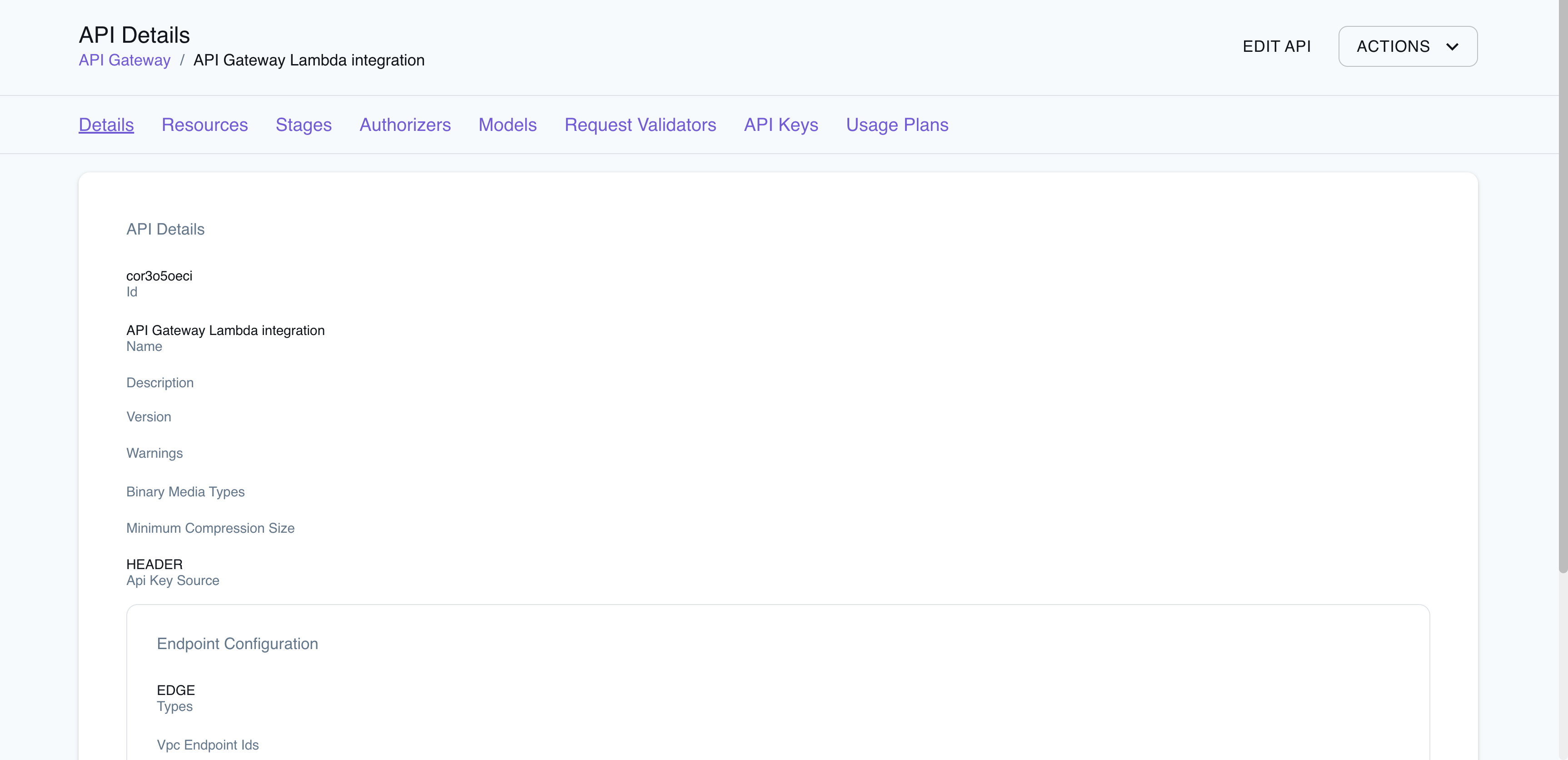
The Resource Browser allows you to perform the following actions:
- Create API: Create a new API (
V1/V2) by clicking on Create API button on top-right and creating a new configuration by clicking on Submit button. - Edit API: Edit the API configuration (
V1/V2) by clicking on Edit API button on top-right and saving the new configuration by clicking on Submit button. - Check the Resources: Click on Resources tab to view the resources associated with the API, along with their details, such as
Id,ParentId,Path Part, andPathand theirHTTPmethod. - Navigate the Stages: Click on Stages tab to view the stages associated with the API, along with their details, such as
Deployment Id,Stage Name,Client Certificate Id, and more. - Delete API: Delete the API configuration (
V1/V2) by selecting the resource, clicking on Remove Selected button on top-right and confirming the deletion by clicking on Continue button.
You can also use the Resource Browser to check out the Authorizers, Models, Request Validators, API Keys, and Usage Plans.
Examples
Section titled “Examples”The following code snippets and sample applications provide practical examples of how to use API Gateway in LocalStack for various use cases:
- API Gateway with Custom Domains
- Websockets via API Gateway V2
- Serverless Container-based APIs with Amazon ECS and Amazon API Gateway
- Step-up Authentication using Amazon Cognito, DynamoDB, API Gateway Lambda Authorizer, and Lambda functions
- Serverless Microservices with Amazon API Gateway, DynamoDB, SQS, and Lambda
- Note-Taking application using AWS SDK for JavaScript, Amazon DynamoDB, Lambda, Cognito, API Gateway, and S3
- For Terraform samples, check out the LocalStack Terraform examples repository
Limitations
Section titled “Limitations”LocalStack accepts the following API Gateway settings through the API, but does not apply them when your API is invoked, or applies them only partially.
Authorization and access control
Section titled “Authorization and access control”- Resource policies: LocalStack stores resource policies but does not evaluate them.
- Private APIs:
PRIVATEAPIs are reachable without a VPC endpoint. - Lambda authorizers: LocalStack does not cache authorizer results, so
authorizerResultTtlInSecondshas no effect. - Usage plans: For REST and WebSocket APIs, LocalStack validates API keys against usage plans, but does not enforce throttling or quota limits.
disableExecuteApiEndpoint: The defaultexecute-apiendpoint stays reachable when you disable it.
Stages and invocation
Section titled “Stages and invocation”- Stage and method throttling, caching, access logging, execution logging and X-Ray tracing have no effect.
- LocalStack does not apply the integration timeout (
timeoutInMillis) or response compression (minimumCompressionSize). - Response streaming (
responseTransferMode: STREAM) is not supported. - Client certificates are not sent to HTTP backends.
Custom domain names
Section titled “Custom domain names”- LocalStack serves custom domains with a TLS certificate it provides or generates. Certificates you provide, and mutual TLS settings, are not used.
- Private custom domain names are not supported. LocalStack treats
PRIVATEdomain names likeREGIONALones. EDGEdomain names do not create a CloudFront distribution.- You cannot change the endpoint type of an existing REST API domain name.
Integrations
Section titled “Integrations”- For REST APIs,
VPC_LINKintegrations call the integration URI directly. - The HTTP API AWS service integration subtypes
EventBridge-PutEventsandAppConfig-GetConfigurationare not supported.
API Coverage (V1)
Section titled “API Coverage (V1)”113 of 124 operations implemented
Available from Hobby; some service variants start at Base. Licensing details
Find an API
Search the full operation list, then sort the table to compare current support.
Loading operations…
| Verified on Kubernetes | ||
|---|---|---|
| Loading operations… | ||
Complete static API list All 124 operations and their current support status
| Operation | Status |
|---|---|
| CreateApiKey | Implemented |
| CreateAuthorizer | Implemented |
| CreateBasePathMapping | Implemented |
| CreateDeployment | Implemented |
| CreateDocumentationPart | Implemented |
| CreateDocumentationVersion | Implemented |
| CreateDomainName | Implemented |
| CreateDomainNameAccessAssociation | Not implemented |
| CreateModel | Implemented |
| CreateRequestValidator | Implemented |
| CreateResource | Implemented |
| CreateRestApi | Implemented |
| CreateStage | Implemented |
| CreateUsagePlan | Implemented |
| CreateUsagePlanKey | Implemented |
| CreateVpcLink | Implemented |
| DeleteApiKey | Implemented |
| DeleteAuthorizer | Implemented |
| DeleteBasePathMapping | Implemented |
| DeleteClientCertificate | Implemented |
| DeleteDeployment | Implemented |
| DeleteDocumentationPart | Implemented |
| DeleteDocumentationVersion | Implemented |
| DeleteDomainName | Implemented |
| DeleteDomainNameAccessAssociation | Not implemented |
| DeleteGatewayResponse | Implemented |
| DeleteIntegration | Implemented |
| DeleteIntegrationResponse | Implemented |
| DeleteMethod | Implemented |
| DeleteMethodResponse | Implemented |
| DeleteModel | Implemented |
| DeleteRequestValidator | Implemented |
| DeleteResource | Implemented |
| DeleteRestApi | Implemented |
| DeleteStage | Implemented |
| DeleteUsagePlan | Implemented |
| DeleteUsagePlanKey | Implemented |
| DeleteVpcLink | Implemented |
| FlushStageAuthorizersCache | Not implemented |
| FlushStageCache | Not implemented |
| GenerateClientCertificate | Implemented |
| GetAccount | Implemented |
| GetApiKey | Implemented |
| GetApiKeys | Implemented |
| GetAuthorizer | Implemented |
| GetAuthorizers | Implemented |
| GetBasePathMapping | Implemented |
| GetBasePathMappings | Implemented |
| GetClientCertificate | Implemented |
| GetClientCertificates | Implemented |
| GetDeployment | Implemented |
| GetDeployments | Implemented |
| GetDocumentationPart | Implemented |
| GetDocumentationParts | Implemented |
| GetDocumentationVersion | Implemented |
| GetDocumentationVersions | Implemented |
| GetDomainName | Implemented |
| GetDomainNameAccessAssociations | Not implemented |
| GetDomainNames | Implemented |
| GetExport | Implemented |
| GetGatewayResponse | Implemented |
| GetGatewayResponses | Implemented |
| GetIntegration | Implemented |
| GetIntegrationResponse | Implemented |
| GetMethod | Implemented |
| GetMethodResponse | Implemented |
| GetModel | Implemented |
| GetModelTemplate | Not implemented |
| GetModels | Implemented |
| GetRequestValidator | Implemented |
| GetRequestValidators | Implemented |
| GetResource | Implemented |
| GetResources | Implemented |
| GetRestApi | Implemented |
| GetRestApis | Implemented |
| GetSdk | Not implemented |
| GetSdkType | Not implemented |
| GetSdkTypes | Not implemented |
| GetStage | Implemented |
| GetStages | Implemented |
| GetTags | Implemented |
| GetUsage | Implemented |
| GetUsagePlan | Implemented |
| GetUsagePlanKey | Implemented |
| GetUsagePlanKeys | Implemented |
| GetUsagePlans | Implemented |
| GetVpcLink | Implemented |
| GetVpcLinks | Implemented |
| ImportApiKeys | Implemented |
| ImportDocumentationParts | Implemented |
| ImportRestApi | Implemented |
| PutGatewayResponse | Implemented |
| PutIntegration | Implemented |
| PutIntegrationResponse | Implemented |
| PutMethod | Implemented |
| PutMethodResponse | Implemented |
| PutRestApi | Implemented |
| RejectDomainNameAccessAssociation | Not implemented |
| TagResource | Implemented |
| TestInvokeAuthorizer | Not implemented |
| TestInvokeMethod | Implemented |
| UntagResource | Implemented |
| UpdateAccount | Implemented |
| UpdateApiKey | Implemented |
| UpdateAuthorizer | Implemented |
| UpdateBasePathMapping | Implemented |
| UpdateClientCertificate | Implemented |
| UpdateDeployment | Implemented |
| UpdateDocumentationPart | Implemented |
| UpdateDocumentationVersion | Implemented |
| UpdateDomainName | Implemented |
| UpdateGatewayResponse | Implemented |
| UpdateIntegration | Implemented |
| UpdateIntegrationResponse | Implemented |
| UpdateMethod | Implemented |
| UpdateMethodResponse | Implemented |
| UpdateModel | Implemented |
| UpdateRequestValidator | Implemented |
| UpdateResource | Implemented |
| UpdateRestApi | Implemented |
| UpdateStage | Implemented |
| UpdateUsage | Implemented |
| UpdateUsagePlan | Implemented |
| UpdateVpcLink | Implemented |
API Coverage (V2)
Section titled “API Coverage (V2)”73 of 103 operations implemented
Available from Hobby; some service variants start at Base. Licensing details
Find an API
Search the full operation list, then sort the table to compare current support.
Loading operations…
| Verified on Kubernetes | ||
|---|---|---|
| Loading operations… | ||
Complete static API list All 103 operations and their current support status
| Operation | Status |
|---|---|
| CreateApi | Implemented |
| CreateApiMapping | Implemented |
| CreateAuthorizer | Implemented |
| CreateDeployment | Implemented |
| CreateDomainName | Implemented |
| CreateIntegration | Implemented |
| CreateIntegrationResponse | Implemented |
| CreateModel | Implemented |
| CreatePortal | Not implemented |
| CreatePortalProduct | Not implemented |
| CreateProductPage | Not implemented |
| CreateProductRestEndpointPage | Not implemented |
| CreateRoute | Implemented |
| CreateRouteResponse | Implemented |
| CreateRoutingRule | Implemented |
| CreateStage | Implemented |
| CreateVpcLink | Implemented |
| DeleteAccessLogSettings | Not implemented |
| DeleteApi | Implemented |
| DeleteApiMapping | Implemented |
| DeleteAuthorizer | Implemented |
| DeleteCorsConfiguration | Implemented |
| DeleteDeployment | Implemented |
| DeleteDomainName | Implemented |
| DeleteIntegration | Implemented |
| DeleteIntegrationResponse | Implemented |
| DeleteModel | Implemented |
| DeletePortal | Not implemented |
| DeletePortalProduct | Not implemented |
| DeletePortalProductSharingPolicy | Not implemented |
| DeleteProductPage | Not implemented |
| DeleteProductRestEndpointPage | Not implemented |
| DeleteRoute | Implemented |
| DeleteRouteRequestParameter | Implemented |
| DeleteRouteResponse | Implemented |
| DeleteRouteSettings | Not implemented |
| DeleteRoutingRule | Implemented |
| DeleteStage | Implemented |
| DeleteVpcLink | Implemented |
| ExportApi | Implemented |
| DisablePortal | Not implemented |
| ResetAuthorizersCache | Not implemented |
| GetApi | Implemented |
| GetApiMapping | Implemented |
| GetApiMappings | Implemented |
| GetApis | Implemented |
| GetAuthorizer | Implemented |
| GetAuthorizers | Implemented |
| GetDeployment | Implemented |
| GetDeployments | Implemented |
| GetDomainName | Implemented |
| GetDomainNames | Implemented |
| GetIntegration | Implemented |
| GetIntegrationResponse | Implemented |
| GetIntegrationResponses | Implemented |
| GetIntegrations | Implemented |
| GetModel | Implemented |
| GetModelTemplate | Not implemented |
| GetModels | Implemented |
| GetPortal | Not implemented |
| GetPortalProduct | Not implemented |
| GetPortalProductSharingPolicy | Not implemented |
| GetProductPage | Not implemented |
| GetProductRestEndpointPage | Not implemented |
| GetRoute | Implemented |
| GetRouteResponse | Implemented |
| GetRouteResponses | Implemented |
| GetRoutes | Implemented |
| GetRoutingRule | Implemented |
| ListRoutingRules | Implemented |
| GetStage | Implemented |
| GetStages | Implemented |
| GetTags | Implemented |
| GetVpcLink | Implemented |
| GetVpcLinks | Implemented |
| ImportApi | Implemented |
| ListPortalProducts | Not implemented |
| ListPortals | Not implemented |
| ListProductPages | Not implemented |
| ListProductRestEndpointPages | Not implemented |
| PreviewPortal | Not implemented |
| PublishPortal | Not implemented |
| PutPortalProductSharingPolicy | Not implemented |
| PutRoutingRule | Implemented |
| ReimportApi | Implemented |
| TagResource | Implemented |
| UntagResource | Implemented |
| UpdateApi | Implemented |
| UpdateApiMapping | Implemented |
| UpdateAuthorizer | Implemented |
| UpdateDeployment | Implemented |
| UpdateDomainName | Implemented |
| UpdateIntegration | Implemented |
| UpdateIntegrationResponse | Implemented |
| UpdateModel | Implemented |
| UpdatePortal | Not implemented |
| UpdatePortalProduct | Not implemented |
| UpdateProductPage | Not implemented |
| UpdateProductRestEndpointPage | Not implemented |
| UpdateRoute | Implemented |
| UpdateRouteResponse | Implemented |
| UpdateStage | Implemented |
| UpdateVpcLink | Implemented |
API Coverage (API Gateway Management)
Section titled “API Coverage (API Gateway Management)”3 of 3 operations implemented
Available from Hobby; some service variants start at Base. Licensing details
Find an API
Search the full operation list, then sort the table to compare current support.
Loading operations…
| Verified on Kubernetes | ||
|---|---|---|
| Loading operations… | ||
Complete static API list All 3 operations and their current support status
| Operation | Status |
|---|---|
| DeleteConnection | Implemented |
| GetConnection | Implemented |
| PostToConnection | Implemented |